๐Ÿ”’ Your files stay on your device โ€” core audio processing runs locally. Privacy details โ†’
Free ยท In-browser ยท No audio upload

Online Tremolo & Auto Pan

Pulse volume, move sound across the stereo field, or combine both. Sync to BPM or set Hz, audition the exact Difference signal, and export locally.

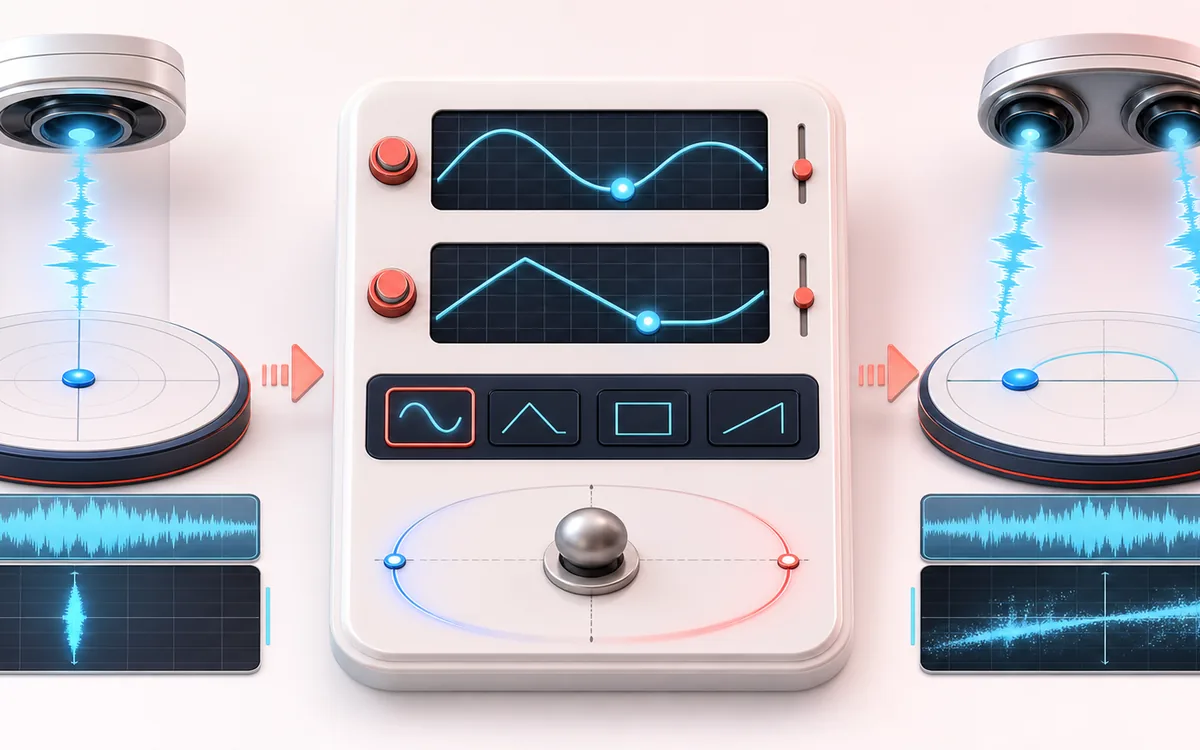
Before-and-after illustration of Tremolo & Auto Pan: Centered source becomes Moving pulse output through Modulate level and pan.
Before → process → afterSee the signal story, then hear it in the workspace.

STEREO FIELD MAP

Pulse and Pan Path

Read width and phase as one spatial decision. The useful view is not simply left versus right; it is the relationship between channels, the center image and what survives a mono fold-down.

Before-and-after illustration of Tremolo & Auto Pan: Centered source becomes Moving pulse output through Modulate level and pan.
Centered sourceModulate level and panMoving pulse output
A stereo field plot: channel energy moves around a stable center while the correlation axis exposes risky out-of-phase extremes.
Open the full signal breakdownBest source, processing logic, limits and three-pass listening check
  1. Start with the right material

    Tempo-synced guitar tremolo, rhythmic pads, rotating percussion, stereo transitions and subtle movement in static loops.

  2. Understand the transformation

    A free-running or BPM-synced LFO uses sine, triangle, square or saw shapes to control amplitude and/or equal-power pan gain with adjustable depth and phase.

  3. Verify the usable result

    Synchronized Original, Processed and Difference monitoring plus an exact-duration WAV or MP3 render; mono sources become stereo only when panning needs two channels.

LFO position

Where this workflow stops

Deep square modulation can click on sharp level changes and extreme auto-pan can be distracting or mono-sensitive. This changes level or position, not delay time like Chorus or Flanger.

THREE-PASS CHECK

Make the final decision by ear

  • Confirm the center stays anchored for important lead material.
  • Fold to mono before export and listen for disappearing detail.
  • Prefer modest width changes when the source already carries phase complexity.

Rhythmic level and stereo movement โ€” without delay modulation

Quick answer: Tremolo changes amplitude; Auto Pan uses an equal-power left/right gain law. Combined applies both at the same LFO rate. This is not chorus, flanging or widening: it creates no delayed voices and no pitch modulation.

Timing
Free rate from 0.05 to 20 Hz, or BPM sync from 30 to 300 BPM with straight, dotted and triplet note divisions.
Shape
Sine, triangle, square and saw waveforms with adjustable start phase, stereo phase offset, tremolo depth and pan width.
Output contract
Duration, decoded sample rate and frame count stay exact. Tremolo keeps source channel count; mono Auto Pan or Combined intentionally becomes stereo.

How to use the tremolo and auto-pan tool

  1. Choose a mono or stereo audio file, or generate the deterministic local demo.
  2. Select Tremolo, Auto Pan or Combined, then choose a preset or adjust rate, depth, waveform, phase and width.
  3. Use a free rate in hertz or sync the LFO to BPM with a musical note division.
  4. Process locally, then switch among Original, Processed and Difference without losing the playback position.
  5. Download the current processed result as a new WAV or MP3 file.

Private by design: selected audio is decoded, rendered and encoded in this browser and is not uploaded to AudioWrench. Normal page assets and the same-origin MP3 encoder may still be requested. Inputs are limited to 80 MB and 15 minutes; a second decoded-memory check can refuse work earlier on constrained screens.

Practical settings

Tremolo & Auto Pan: quick answer and technical limits

Quick answer: A local modulation tool that pulses amplitude, moves level between stereo channels with equal-power panning, or combines both motions.

Best for
Tempo-synced guitar tremolo, rhythmic pads, rotating percussion, stereo transitions and subtle movement in static loops.
How it works
A free-running or BPM-synced LFO uses sine, triangle, square or saw shapes to control amplitude and/or equal-power pan gain with adjustable depth and phase.
What you get
Synchronized Original, Processed and Difference monitoring plus an exact-duration WAV or MP3 render; mono sources become stereo only when panning needs two channels.

Know before you use it: Deep square modulation can click on sharp level changes and extreme auto-pan can be distracting or mono-sensitive. This changes level or position, not delay time like Chorus or Flanger.

Privacy: Selected audio is processed in this browser and is not uploaded to AudioWrench. Normal page assets can still be requested as described in the privacy notice. Privacy details โ†’

FAQ

What is the difference between tremolo and auto pan?
Tremolo changes amplitude over time. Auto pan moves level between the left and right channels with an equal-power pan law. Neither mode uses a modulated delay, so this tool is not chorus, flanging or a stereo widener.
How does BPM sync calculate the LFO rate?
BPM sync treats a quarter note as one beat. At 120 BPM a quarter-note cycle is 2 Hz, an eighth-note cycle is 4 Hz and a dotted-quarter cycle is 1.333 Hz. The rendered file keeps the exact decoded frame count and sample rate.
Why can a mono auto-pan export become stereo?
A moving panorama needs separate left and right channels. Tremolo-only keeps a mono source mono, while Auto Pan and Combined intentionally render a mono source as stereo using equal-power gains. Stereo sources remain stereo.
Are my files uploaded, and are WAV and MP3 lossless?
Selected audio is decoded, processed and encoded on your device and is not uploaded to AudioWrench. Normal page assets and the same-origin MP3 encoder can still be requested. WAV is a new 16-bit PCM render; MP3 is a new lossy local encode.

Related effects