Wow & Flutter Corrector
Track pitch drift against a stable note or harmonic, separate slow wow from faster flutter, edit the measured curve and render a bounded correction without uploading your recording.
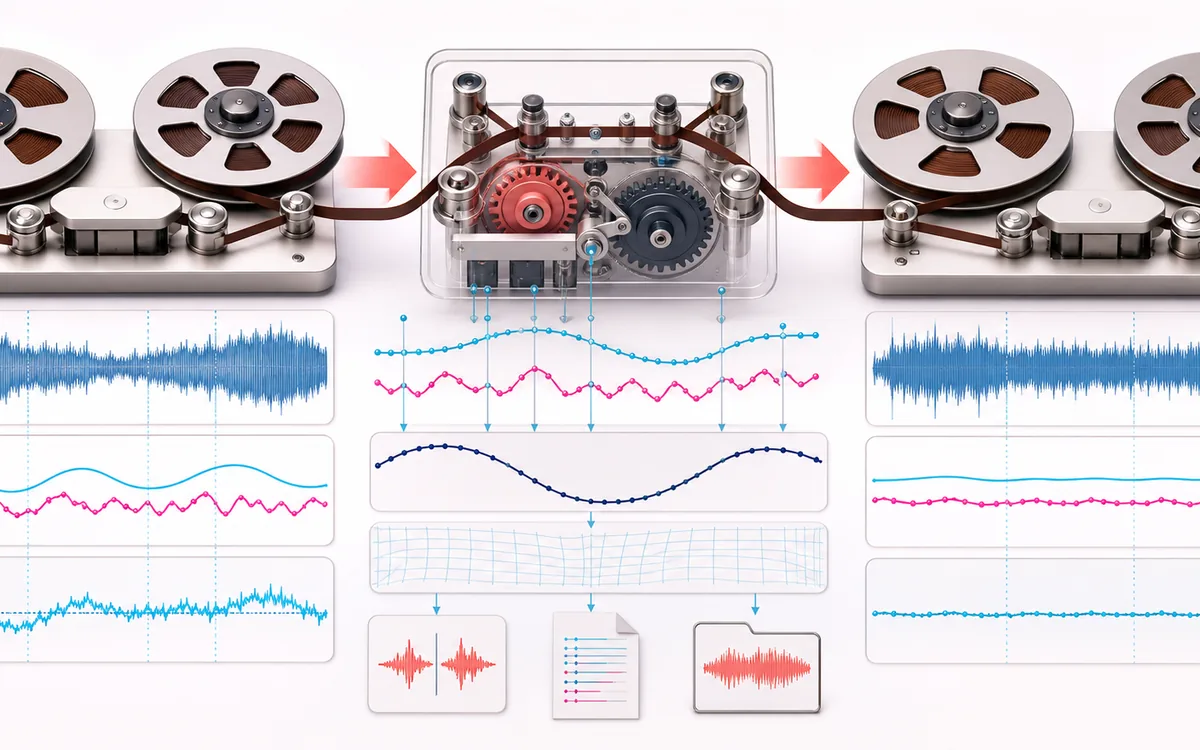
RESTORATION MAP
Pitch Drift Trace
Separate the damaged event from healthy context. A repair is safest when the affected span is narrow, the surrounding signal is trustworthy and the difference audition contains mostly the defect.
Open the full signal breakdownBest source, processing logic, limits and three-pass listening check
- Unstable recording
Start with the right material
Tape, cassette, vinyl or mechanical transfers containing a sustained tone, stable musical partial or pilot reference that exposes periodic speed drift.
- Track and counter drift
Understand the transformation
Windowed pitch tracking resolves a confidence-weighted cents curve around the selected reference frequency; smoothing and correction limits shape the inverse time map used for local interpolated resampling.
- Stabilized audio
Verify the usable result
Visible wow and flutter curves, synchronized A/B and Difference audition, an exact-length corrected WAV and CSV or JSON drift data.
Where this workflow stops
The method needs a sufficiently stable tonal reference and cannot know whether expressive vibrato belongs to the performance. Dense or changing mixes, noise and missing harmonics can create unreliable tracking that should not be corrected automatically.
Make the final decision by ear
- Review every detected event near drums, consonants and other sharp attacks.
- Use Difference audition to hear what the repair removes or invents.
- Prefer several small repairs over one aggressive global pass.
- Tonal-pilot tracking
- A known or estimated stable frequency acts as the measurement reference for windowed phase drift.
- Inspect before render
- Total correction, slower wow and faster flutter remain visible; individual correction points can be selected and edited.
- Bounded local result
- Maximum correction and wet mix constrain time-varying interpolation while preserving the exact decoded frame count.
How to correct wow and flutter online
- Load audio with an exposed sustained note or harmonic, or explicitly generate the authored demo.
- Mark a stable pilot region and enter its expected frequency or review the automatic suggestion.
- Choose tracking resolution and smoothing, analyze the drift, then inspect or edit the cents curve.
- Limit correction depth, set wet mix, render locally and compare Source, Corrected and Difference before WAV, CSV or JSON export.
A measurement-led restoration workflow
Wow and flutter are time-varying speed errors, so a single pitch shift cannot remove them. This workspace estimates changing frequency relative to one tonal pilot and converts that path into a bounded read-speed correction. The output timeline stays the same length; the sampling position moves within it.
When the tracker should refuse the job
The method needs a sufficiently stable tone or harmonic. A dense full mix, changing melody, drums, speech, broad noise or a masked reference can lower confidence or make the curve follow musical pitch instead of transport drift. In those cases, isolate a pilot if possible or use specialist restoration software with manual supervision. This is not a universal magic fix for complete mixes.
Privacy: selected recordings are decoded, measured, resampled and exported on this device. They are not uploaded to AudioWrench.
Wow & Flutter Corrector: quick answer and technical limits
Quick answer: A reference-assisted pitch restoration workspace that measures time-varying frequency error, separates slow wow from faster flutter and applies a bounded inverse timing correction.
- Best for
- Tape, cassette, vinyl or mechanical transfers containing a sustained tone, stable musical partial or pilot reference that exposes periodic speed drift.
- How it works
- Windowed pitch tracking resolves a confidence-weighted cents curve around the selected reference frequency; smoothing and correction limits shape the inverse time map used for local interpolated resampling.
- What you get
- Visible wow and flutter curves, synchronized A/B and Difference audition, an exact-length corrected WAV and CSV or JSON drift data.
Know before you use it: The method needs a sufficiently stable tonal reference and cannot know whether expressive vibrato belongs to the performance. Dense or changing mixes, noise and missing harmonics can create unreliable tracking that should not be corrected automatically.
Privacy: Selected audio is processed in this browser and is not uploaded to AudioWrench. Normal page assets can still be requested as described in the privacy notice. Privacy details →