Click & Crackle Remover Online.
Find narrow impulse noise in music and transfers, approve every repair marker, then compare Before, After and Difference without uploading audio.
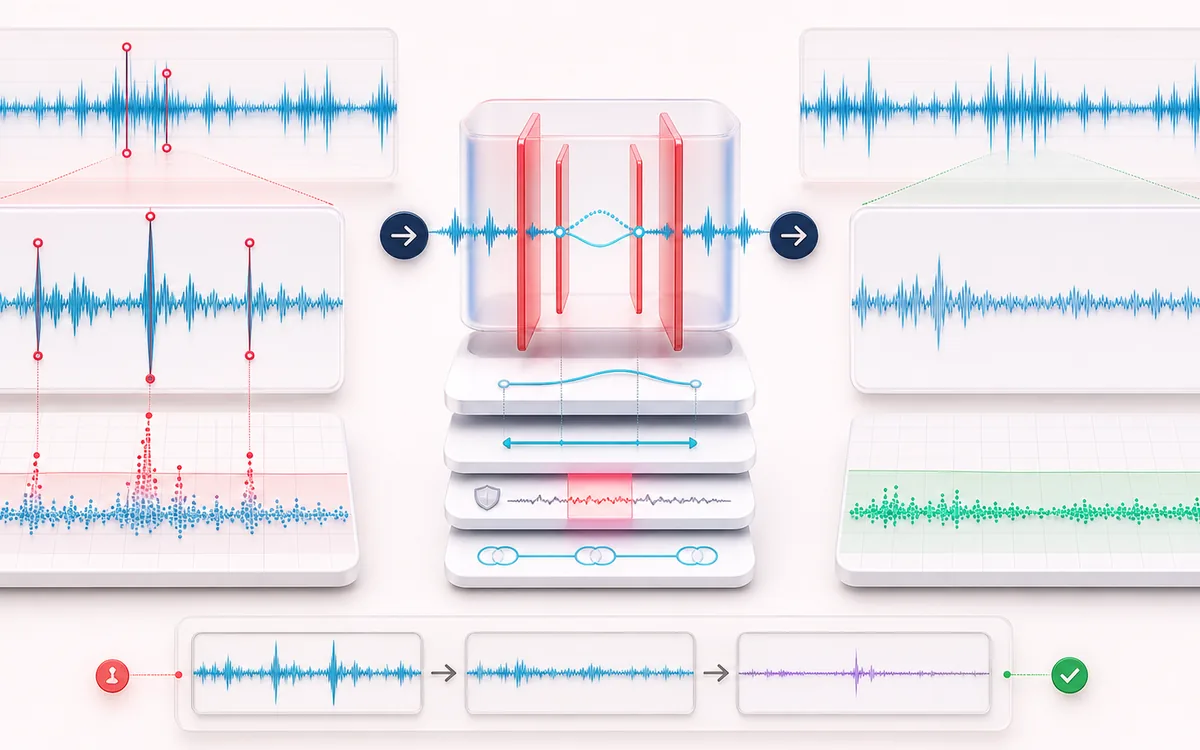
RESTORATION MAP
Impulse Repair Markers
Separate the damaged event from healthy context. A repair is safest when the affected span is narrow, the surrounding signal is trustworthy and the difference audition contains mostly the defect.
Open the full signal breakdownBest source, processing logic, limits and three-pass listening check
- Click-damaged audio
Start with the right material
Reducing isolated record clicks, digital pops, cable ticks and light crackle without running broad noise reduction across the complete recording.
- Interpolate marked events
Understand the transformation
A robust local residual and scale estimate separates narrow outliers from surrounding waveform motion; width, channel-link and transient-protection rules bound each candidate before short contextual interpolation rebuilds selected samples.
- De-clicked render
Verify the usable result
Original, repaired and Difference audition with marker review plus an exact-duration WAV and CSV or JSON event list.
Where this workflow stops
Dense crackle, clipped transients and percussion can resemble clicks, while long scratches contain information that short interpolation cannot recover. Every marker should be auditioned, especially on drums and bright attacks.
Make the final decision by ear
- Review every detected event near drums, consonants and other sharp attacks.
- Use Difference audition to hear what the repair removes or invents.
- Prefer several small repairs over one aggressive global pass.
- Input
- One mono or stereo recording, or an explicit deterministic demo containing twelve authored impulses and a protected musical transient.
- Detection
- Short departure-and-return edges scored against robust local slope residuals and median absolute deviation, bounded by maximum width.
- Output
- Same-frame-count repaired WAV, Before/After/Difference previews and enabled-state marker data as CSV or JSON.
How to remove isolated clicks and crackle
- Load audio. Choose a recording or generate the deterministic local demo.
- Tune detection. Set sensitivity, maximum click width, channel mode and transient protection.
- Review repair markers. Run the scan, zoom into candidates and disable any wanted attack.
- Compare and export. Listen to Before, After and Difference before downloading WAV, CSV or JSON.
Quick answer: this tool repairs sparse impulse noise across music, field recordings and digitized media. It is not the speech-specific Mouth Click Remover, and unlike Vinyl Effect, it removes candidate crackle instead of adding it.
What the detector measures
A click candidate must depart sharply from its local waveform and return in the opposite direction inside the selected one-to-sixteen-sample width. The entry and return are measured against the median and median absolute deviation of nearby slopes. Transient protection then checks surrounding activity, envelope movement and the density of strong slopes so a drum hit or picked note is less likely to be mistaken for isolated damage.
Linked stereo groups overlapping detections and repairs the same time span on both channels. This preserves timing for defects shared by a stereo transfer. Independent channels leaves a click found only on the left or right as a channel-specific event, which is useful for sparse asymmetric crackle.
What repair changes—and what it cannot know
Each enabled span is rebuilt with a bounded cubic Hermite bridge using clean flank values and local slopes. Clean anchor samples remain fixed, and the curve is limited to the nearby amplitude range. Disabled markers are copied exactly. The output keeps the decoded sample rate, channel count, frame count and duration.
- Good fit: isolated one-to-few-sample ticks, sparse digital clicks and light record crackle.
- Different problem: clipped plateaus belong in Audio Declipper; steady hiss belongs in Noise Remover.
- Honest limit: interpolation estimates plausible missing samples. It does not recover a known clean master or remove long scratches.
- Review matters: aggressive sensitivity can flag tiny percussion and string attacks, so use zoom and Difference audition before export.
Click & Crackle Remover: quick answer and technical limits
Quick answer: A local restoration editor that finds very short impulsive discontinuities, exposes every candidate as an editable marker and reconstructs only enabled spans from their immediate clean context.
- Best for
- Reducing isolated record clicks, digital pops, cable ticks and light crackle without running broad noise reduction across the complete recording.
- How it works
- A robust local residual and scale estimate separates narrow outliers from surrounding waveform motion; width, channel-link and transient-protection rules bound each candidate before short contextual interpolation rebuilds selected samples.
- What you get
- Original, repaired and Difference audition with marker review plus an exact-duration WAV and CSV or JSON event list.
Know before you use it: Dense crackle, clipped transients and percussion can resemble clicks, while long scratches contain information that short interpolation cannot recover. Every marker should be auditioned, especially on drums and bright attacks.
Privacy: Selected audio is processed in this browser and is not uploaded to AudioWrench. Normal page assets can still be requested as described in the privacy notice. Privacy details →