Custom Impulse Response Convolver
Load your own impulse response, prepare its exact useful region, and convolve it with audio entirely in the browser. Keep the real tail, compare the delta, and export.
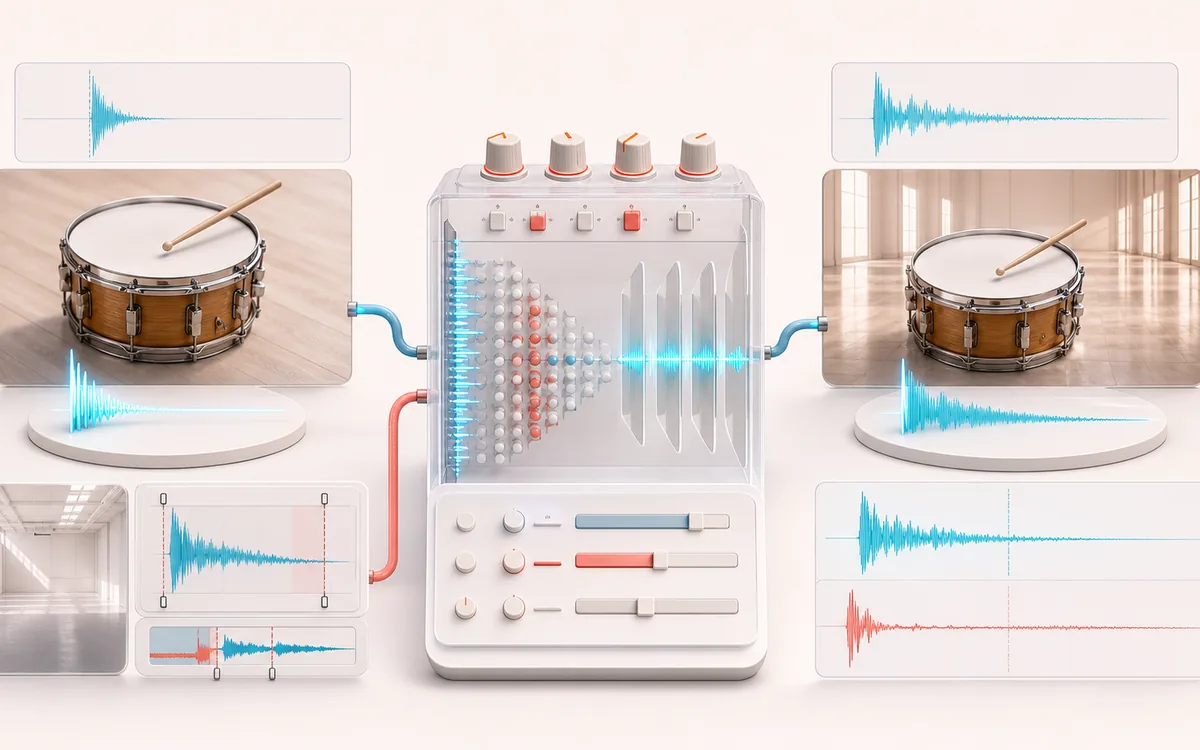
TIME + SPACE MAP
Impulse Tail Lab
Trace the dry event into motion, repeats or ambience. The visual separates the direct sound from what arrives later, making timing, density, feedback and stereo movement easier to reason about.
Open the full signal breakdownBest source, processing logic, limits and three-pass listening check
- Source and impulse
Start with the right material
Trying captured rooms, speaker cabinets, hardware responses and unusual sound-design impulses without installing a convolution plugin.
- Convolve response
Understand the transformation
The decoded IR can be trimmed, reversed, normalized and delayed before direct time-domain or partitioned-style convolution combines every source sample with its impulse coefficients and wet/dry gain.
- Space-colored audio
Verify the usable result
Original, wet and Difference monitoring, an inspectable IR timeline and a WAV or MP3 render whose duration includes the selected pre-delay and convolution tail.
Where this workflow stops
The output is only as accurate as the supplied IR and browser decoding. Long stereo impulses require substantial CPU and memory, normalization changes IR gain, and this does not estimate or capture a physical room.
Make the final decision by ear
- Judge timing against the rhythm rather than in solo.
- Check whether the tail masks the next word, note or transient.
- Audition mono and headphones when the effect uses stereo motion.
- Two local inputs
- A mono or stereo source plus an arbitrary mono or stereo IR decoded by the browser.
- IR preparation
- Start/end trim, reverse and shared-peak normalization before convolution, plus pre-delay, wet/dry and output trim.
- Tail contract
- For nonzero Wet, output frames equal source + processed IR + pre-delay − 1. WAV retains that exact frame count.
How to convolve audio with a custom IR
- Load source audio or generate the local transient-rich demo.
- Load your own impulse response, or start with one of the short generated examples.
- Trim silence or unwanted decay, optionally reverse and normalize the processed IR, then set pre-delay, Wet and output trim.
- Render the complete tail locally, compare Original, Wet and Difference, then export WAV or MP3.
A general convolver, not a synthetic room preset
This tool applies the waveform you provide. An IR may represent a measured space, speaker, resonant object, filter or a designed response, but the convolver does not identify or validate that meaning. The short built-in examples simply make the workflow testable before you load your own file.
Trim happens before reverse and normalization. Pre-delay inserts exact zero frames before the wet response. When Wet is above zero, the dry source is padded with zeros so the full convolution tail is retained rather than cut at the source duration.
Channel and output limits
- Mono source plus mono IR produces mono. If either side is stereo, output is stereo and the available mono side is reused for both output channels.
- Normalization uses one shared peak across processed IR channels, preserving their level relationship.
- Very long source-plus-IR combinations require a large FFT and are refused before allocation when they exceed the viewport memory budget.
- MP3 is a new lossy encode with possible codec padding; exact output frames are preserved by WAV.
Privacy: source and IR files are decoded, prepared, convolved and encoded on this device and are not uploaded to AudioWrench. Normal page resources can still be requested according to the privacy notice.
Custom Impulse Response Convolver: quick answer and technical limits
Quick answer: A custom impulse-response loader that convolves a source with an uploaded room, cabinet or creative IR and preserves the resulting decay tail.
- Best for
- Trying captured rooms, speaker cabinets, hardware responses and unusual sound-design impulses without installing a convolution plugin.
- How it works
- The decoded IR can be trimmed, reversed, normalized and delayed before direct time-domain or partitioned-style convolution combines every source sample with its impulse coefficients and wet/dry gain.
- What you get
- Original, wet and Difference monitoring, an inspectable IR timeline and a WAV or MP3 render whose duration includes the selected pre-delay and convolution tail.
Know before you use it: The output is only as accurate as the supplied IR and browser decoding. Long stereo impulses require substantial CPU and memory, normalization changes IR gain, and this does not estimate or capture a physical room.
Privacy: Selected audio is processed in this browser and is not uploaded to AudioWrench. Normal page assets can still be requested as described in the privacy notice. Privacy details →