Online Reverb Maker & Designer.
Design a deterministic synthetic impulse response, inspect the decay envelope, audition dry versus reverb, and export audio, IR WAV or a settings receipt — entirely in your browser.
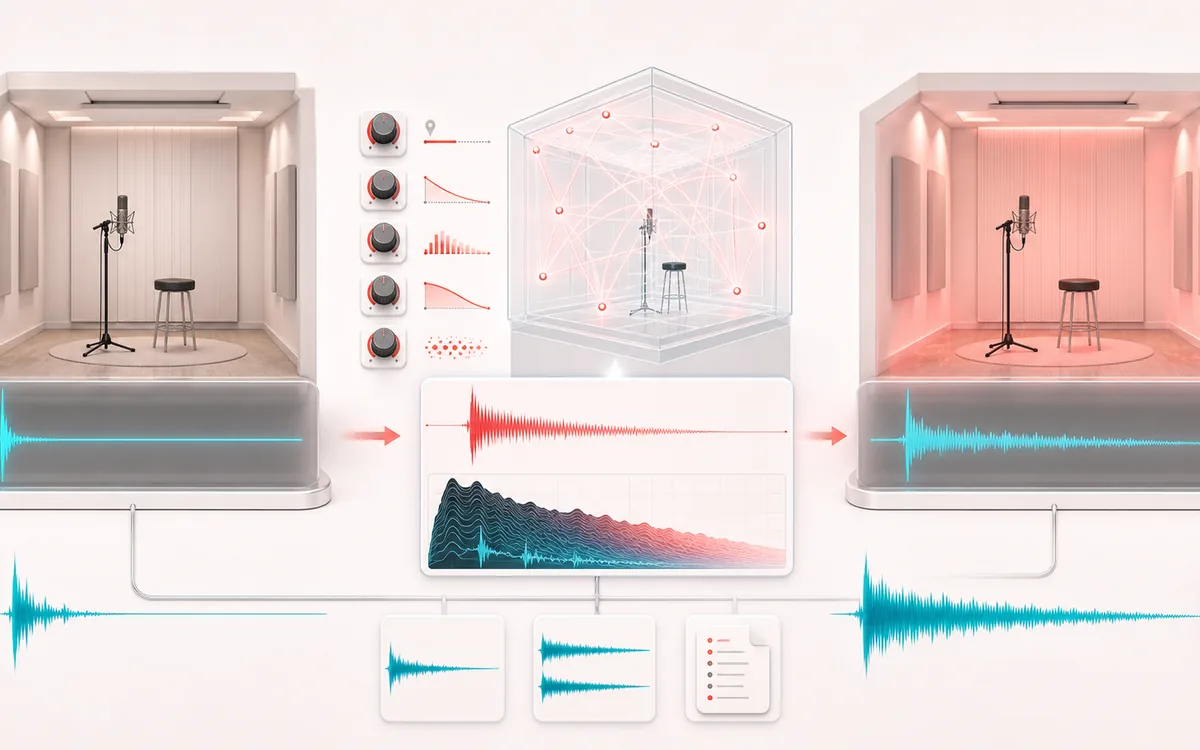
TIME + SPACE MAP
Room Decay View
Trace the dry event into motion, repeats or ambience. The visual separates the direct sound from what arrives later, making timing, density, feedback and stereo movement easier to reason about.
Open the full signal breakdownBest source, processing logic, limits and three-pass listening check
- Dry recording
Start with the right material
Designing space around dry vocals, instruments, sound effects or ambient edits while keeping the exact signal choices visible.
- Build reflections
Understand the transformation
A seeded synthetic impulse is shaped by preset, pre-delay, decay, brightness and real early-reflection density, then convolved with the source for a source + IR - 1 wet render.
- Reverberant render
Verify the usable result
A dry or wet audio render, a stereo 48 kHz 16-bit impulse-response WAV, and a versioned JSON settings receipt.
Where this workflow stops
The spaces are algorithmically generated approximations, not measured or sampled physical rooms. Sources are capped at 20 minutes and conservative render memory at 192 MiB on mobile or 384 MiB on desktop.
Make the final decision by ear
- Judge timing against the rhythm rather than in solo.
- Check whether the tail masks the next word, note or transient.
- Audition mono and headphones when the effect uses stereo motion.
How to make reverb online
- Start with a room-style, hall-style, plate-style, cathedral-style or spring-style synthetic character.
- Set wet/dry mix, decay support, high-frequency damping, vocal-friendly pre-delay and early-reflection density.
- Read the deterministic impulse/envelope view and exact frame semantics before rendering.
- Optionally load a vocal, instrument or mix, render it, then switch between Dry A and Reverb mix B.
- Download the processed WAV or MP3, the stereo 48 kHz IR WAV, or a JSON settings receipt.
This online reverb maker uses Web Audio convolution with a deterministic, generated impulse response. The preset names describe design characters only: the IR is not sampled from, measured in or identified with a physical room. The same settings produce the same synthetic IR, including the actual early-reflection tap pattern and damping applied to the diffuse tail.
For vocal reverb, pre-delay can preserve word definition before reflections arrive, while damping can keep sibilants from building up. Decay support controls the exact generated IR duration; the displayed synthetic RT60 target describes the design envelope and is not a measured estimate or an acoustic measurement. For the slowed-down aesthetic version, the Slowed + Reverb tool combines both moves.
Add Reverb: quick answer and technical limits
Quick answer: A deterministic synthetic Reverb Designer with inspectable impulse evidence, dry/wet A/B and accountable render, IR WAV and settings exports.
- Best for
- Designing space around dry vocals, instruments, sound effects or ambient edits while keeping the exact signal choices visible.
- How it works
- A seeded synthetic impulse is shaped by preset, pre-delay, decay, brightness and real early-reflection density, then convolved with the source for a source + IR - 1 wet render.
- What you get
- A dry or wet audio render, a stereo 48 kHz 16-bit impulse-response WAV, and a versioned JSON settings receipt.
Know before you use it: The spaces are algorithmically generated approximations, not measured or sampled physical rooms. Sources are capped at 20 minutes and conservative render memory at 192 MiB on mobile or 384 MiB on desktop.
Privacy: Selected audio is processed in this browser and is not uploaded to AudioWrench. Normal page assets can still be requested as described in the privacy notice. Privacy details →