De-Reverb Audio Online
Reduce persistent room energy behind speech and solo vocals. Protect direct attacks, see the late-energy change, and export the complete processed timeline locally.
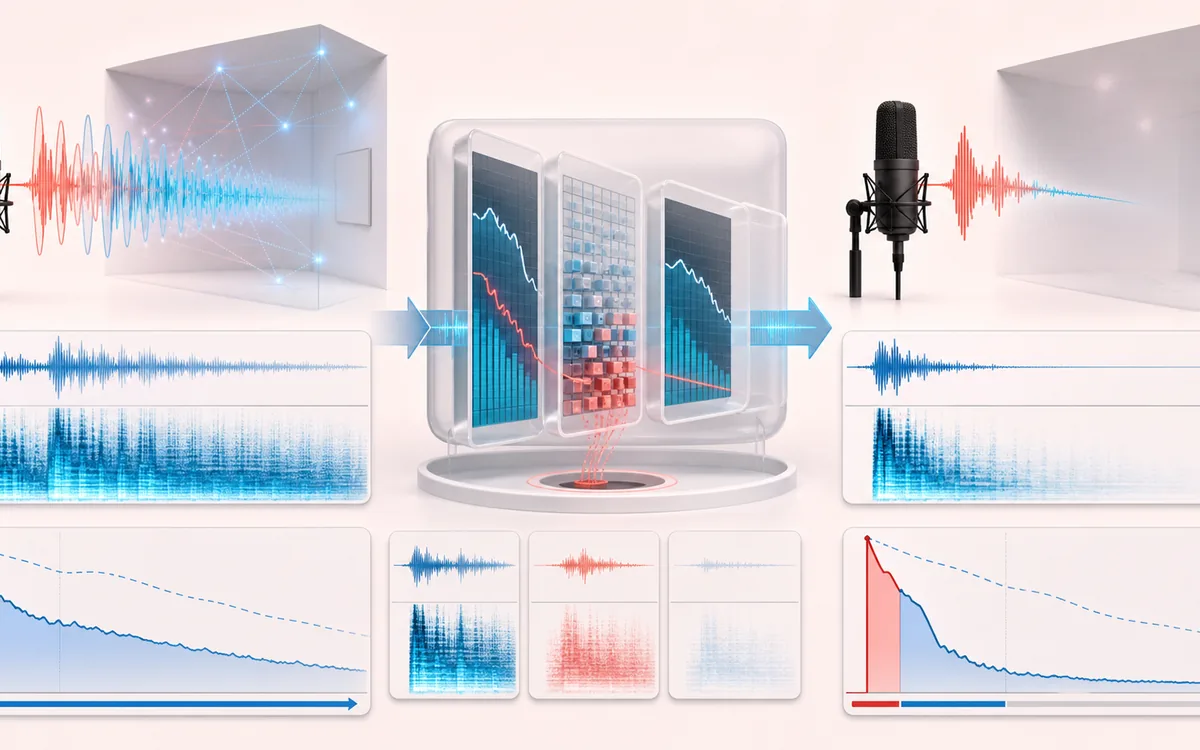
RESTORATION MAP
Room Tail Reduction
Separate the damaged event from healthy context. A repair is safest when the affected span is narrow, the surrounding signal is trustworthy and the difference audition contains mostly the defect.
Open the full signal breakdownBest source, processing logic, limits and three-pass listening check
- Reverberant speech
Start with the right material
Improving moderately reverberant speech, interviews and isolated instruments before transcription, compression or delivery when a cleaner source cannot be recorded.
- Reduce late reflections
Understand the transformation
Short-time spectral frames track a bounded decaying energy floor, reduce bins dominated by recent room tail and overlap-add the protected direct signal at the original frame count.
- Drier recording
Verify the usable result
Original, Reduced and Difference monitoring plus an exact-duration WAV or MP3 render with a visible before-and-after late-energy trace.
Where this workflow stops
It cannot reconstruct an anechoic recording or separate every reflection from wanted sustain. Strong reduction can sound watery, and dense music, long notes or changing rooms are difficult cases.
Make the final decision by ear
- Review every detected event near drums, consonants and other sharp attacks.
- Use Difference audition to hear what the repair removes or invents.
- Prefer several small repairs over one aggressive global pass.
- Best for
- Speech, voiceover, podcast dialogue and isolated solo vocals recorded with audible but not overwhelming room reflections.
- Processor
- Overlapping short-time spectra track energy that persists after attacks and apply frequency-dependent late-tail attenuation.
- Output
- Original decoded sample rate, channels and frame count, three audition signals, plus local WAV or MP3 export.
How to reduce room reverb online
- Load a speech or isolated vocal recording, or generate the deterministic local room demo.
- Start with Dialogue Clean, Vocal Tight, Podcast Room or Strong Reflection.
- Render locally and inspect the decay scanner. Lower Reduction or raise Transient protect if consonants lose bite.
- Switch between Original, Reduced and Difference at the same timeline position, then export WAV or MP3.
Spectral-decay suppression, not a gate
A noise gate reacts mainly to total level and closes during quiet gaps. This processor works inside overlapping frequency-domain frames. It remembers energy in each bin after an onset, estimates how much belongs to a continuing room tail, and reduces a bounded part of that estimate while retaining the original phase and exact decoded timeline.
Tail memory describes how long reflections are expected to persist. Transient protect backs away when new spectral energy arrives, while low preserve avoids thinning the lower voice range. Difference audition is original minus reduced; it is a diagnostic signal, not a perfectly isolated reverb stem.
Limits of single-recording de-reverberation
- It cannot reconstruct the unknowable anechoic original after direct sound and reflections have mixed.
- Strong reduction can create metallic texture, pumping, shortened word endings or softened ambience.
- Dense music, overlapping speakers, long discrete echoes and moving noise are harder than one close voice.
- This is deterministic browser DSP. It makes no AI, source-separation or studio-restoration guarantee.
Privacy: selected audio is decoded, processed and encoded in this browser and is not uploaded to AudioWrench. Normal page resources can still be requested according to the privacy notice.
De-Reverb: quick answer and technical limits
Quick answer: A local room-tail reducer that estimates persistent spectral decay after direct sound and suppresses that late energy while protecting stronger attacks and the original timeline.
- Best for
- Improving moderately reverberant speech, interviews and isolated instruments before transcription, compression or delivery when a cleaner source cannot be recorded.
- How it works
- Short-time spectral frames track a bounded decaying energy floor, reduce bins dominated by recent room tail and overlap-add the protected direct signal at the original frame count.
- What you get
- Original, Reduced and Difference monitoring plus an exact-duration WAV or MP3 render with a visible before-and-after late-energy trace.
Know before you use it: It cannot reconstruct an anechoic recording or separate every reflection from wanted sustain. Strong reduction can sound watery, and dense music, long notes or changing rooms are difficult cases.
Privacy: Selected audio is processed in this browser and is not uploaded to AudioWrench. Normal page assets can still be requested as described in the privacy notice. Privacy details →