Online De-Esser — Reduce Harsh Sibilance
Reduce piercing S, SH and T sounds while the audio plays. Move the spectral focus, adjust Depth and Sensitivity, compare Processed, Original or Delta instantly, then render the complete file locally and export WAV or MP3.
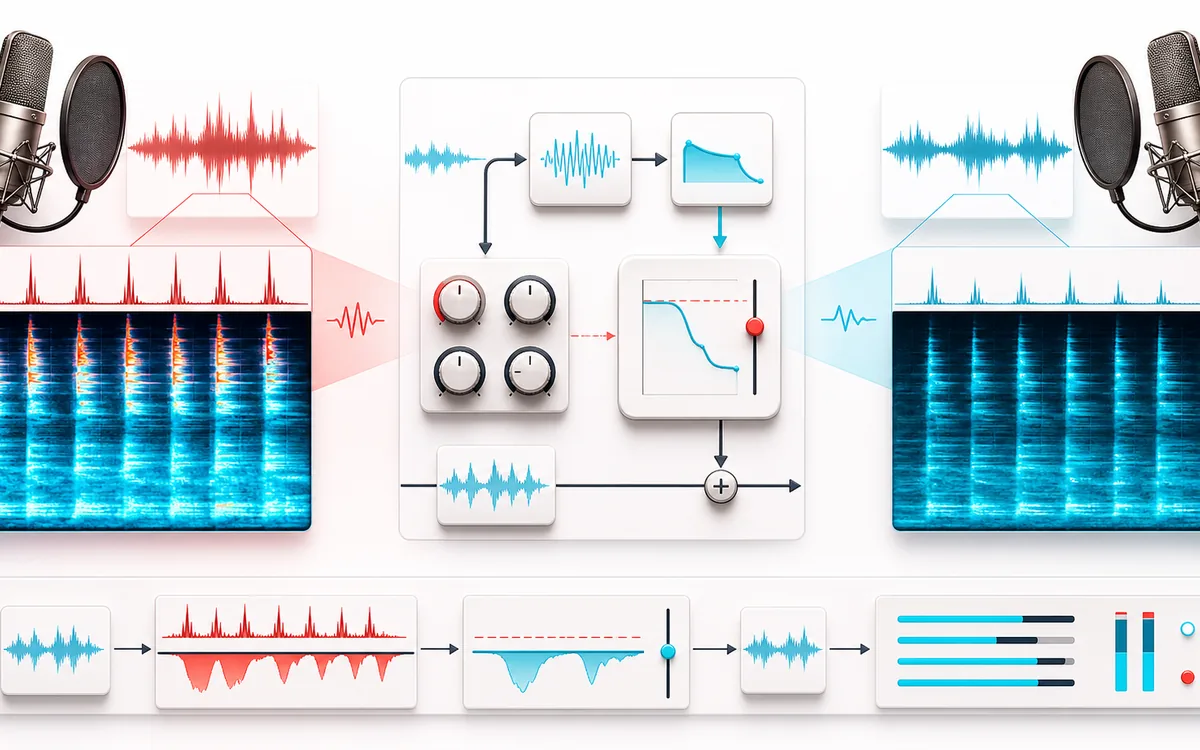
RESTORATION MAP
Sibilance Reduction Lane
Reduce the harsh concentration, not the whole voice. The live graph shows where sibilant energy gathers, which frequencies react and how much focused reduction is being applied.
Open the full signal breakdownBest source, processing logic, limits and three-pass listening check
- Harsh vocal
Start with the right material
Harsh S, SH and T sounds in dry speech, podcast narration, voiceovers and vocal drafts that need a controlled corrective pass.
- Detect and tame esses
Understand the transformation
An adaptive bank measures spectral prominence inside the master Focus and Range. Shape the multi-band sensitivity curve, Selectivity and frequency-aware timing, then choose Split or Wide reduction.
- Smoother vocal
Verify the usable result
Compare Processed, Original and Delta live, then render WAV or MP3 with a receipt for active time, reduction, focused-band change, exact frames, peak and clipping.
Where this workflow stops
This is deterministic spectral dynamics, not phoneme recognition. Cymbals, breath and bright consonants can also trigger it; aggressive settings can dull the voice or create a lisp, so compare Original and Delta while tuning.
Make the final decision by ear
- Use Auto Focus as a starting point, then move Focus and Range while listening.
- Use Delta audition to check that mostly harsh consonant energy is being removed.
- Compare A and B at matched output level and prefer the least Depth that solves the distraction.
- Input
- One voice, vocal, dialogue or mixed audio file in a format your current browser can decode.
- Controls
- Multi-band sensitivity curve, Focus, Range, Sensitivity, Depth, Detail, Selectivity, frequency-aware timing, optional external detector, Split/Wide mode, L/R or M/S, independent spectral/time quality, input, mix and output.
- Output
- A locally rendered full-file preview, WAV or MP3 download and a receipt with measured de-essing activity.
How to reduce sibilance from audio online
- Select a recording that contains harsh or distracting consonants.
- Run Auto Focus, then drag the numbered curve bands over the offending S or SH energy.
- Adjust Sensitivity, Depth, Detail, Selectivity and timing while comparing Processed, Original, Delta or the selected detector band.
- Render the complete file, check the measured receipt and download WAV or MP3.
Quick answer: this online de-esser tracks concentrated energy across a selected spectral range and dynamically reduces only the bands that become harsh. It uses deterministic local DSP and aims to control sibilance while preserving the rest of the voice.
What causes harsh S sounds in voice recordings?
Sibilance is the concentrated high-frequency energy created by consonants such as S, SH, Z, CH and sometimes T. Its perceived harshness changes with the speaker, microphone capsule, distance, angle, room reflections, preamp, EQ, codec and later processing. A bright microphone or a strong treble boost can make an otherwise normal consonant stand out.
A de-esser treats the symptom dynamically: it reacts when energy in the detector band exceeds a threshold. It does not reconstruct a different performance, remove room tone or repair clipping. Better microphone placement and gentler upstream EQ remain valuable when the source can be recorded again.
How each de-esser control changes the result
- Focus and Range
- Place the center and width over the area where consonants sound sharp. Auto Focus scans the loaded file for a useful starting point.
- Sensitivity curve
- Add up to 6 bell, shelf or reject bands, drag them directly on the spectrum and audition the selected detector band without changing the rendered signal.
- Sensitivity
- Sets how readily locally prominent bands trigger reduction. A lower value processes more of the recording.
- Depth, Detail and Selectivity
- Depth caps reduction. Detail narrows detector filters; Selectivity separates local resonances from broad brightness.
- Split and Wide
- Split uses a dynamic high-shelf driven by the strongest reacting detector band. Wide applies that envelope to the full signal for firmer control.
- Attack, release and timing tilt
- Control how quickly attenuation engages and recovers. Timing tilt varies those speeds across frequency so upper bands can react faster without forcing the same timing everywhere.
- Stereo domain and link
- Process Left/Right or Mid/Side, bias individual curve bands, and blend channel linking continuously from independent to fully linked reduction.
- Live and render quality
- Choose 10, 16, 22 or 32 detector bands independently from the detector refresh rate. Keep live and render settings linked, or monitor efficiently and render with denser, faster analysis.
- External detector
- Load a second audio file as a local key, adjust its detector gain and audition it live. The key is aligned to the main timeline and used only for detection.
There is no universal best de-esser frequency. Adult voices often produce troublesome energy somewhere in the upper midrange or treble, but the actual recording should decide the setting. Sweep the detector, listen for the narrow area that exaggerates the consonant, then apply the least reduction that solves the distraction.
Measured receipt for the complete render
The receipt reports what the processor measured and applied across the decoded file, rather than only repeating the selected knobs. Use values such as active-reduction share, maximum and average gain reduction, output peak and clipping status, duration, sample rate and channels to compare revisions. These facts confirm that processing happened; your ears still decide whether speech remains natural.
Avoid the lisp: if consonants lose definition or the voice sounds dull, raise the threshold, reduce the maximum attenuation, move the detector frequency or shorten the recovery. A natural result usually comes from the smallest useful intervention.
Common de-essing workflows
- Podcast and dialogue cleanup: soften sharp speech before final loudness normalization without changing every phrase equally.
- Lead and backing vocals: control bright consonants that become more obvious after compression or treble EQ.
- Voiceover and course audio: reduce listener fatigue in close-mic narration, tutorials, explainers and product videos.
- Streaming and social clips: tame sibilance before a lossy encode emphasizes or smears the harsh area.
De-Esser versus Noise Remover, Compressor and BalanceDAW
- Online De-Esser
- Uses an adaptive focused filter bank to apply time-varying reduction around strong sibilant events.
- Noise Remover
- Targets more continuous background sound. It is not designed specifically for short S and SH consonants.
- Audio Compressor
- Controls broader full-signal dynamics. It can make sibilance more noticeable and does not isolate it as precisely as a focused de-esser.
- BalanceDAW
- Use the studio for multitrack editing, clip gain, detailed automation, EQ and a longer voice-processing chain.
Limits to understand before exporting
- Reduction, not total removal: consonants carry intelligibility. Eliminating their energy completely can make speech unnatural, dull or lisp-like.
- Content can share the band: cymbals, hi-hats, breath, room reflections and bright instruments may also trigger the detector in a full mix.
- Full-file memory use: the source and output are held as decoded audio while rendering. Practical length depends on channels, sample rate, browser and available device memory.
- Browser decoding and resampling: codec support varies, and the browser can resample input before processing. The output describes a new render of decoded PCM, not an untouched container edit.
- WAV versus MP3: WAV avoids another lossy encoding stage but is larger. MP3 is a lossy local re-encode and can introduce high-frequency artifacts around already difficult consonants.
- Rights still apply: process and publish only recordings you created or have permission to edit and redistribute. Local processing does not change copyright or performer rights.
Privacy: selected audio is processed in this browser and is not uploaded to AudioWrench. Normal page assets and same-origin encoder code can still be requested as described in the privacy notice.
Online De-Esser: quick answer and technical limits
Quick answer: A local adaptive de-esser that tracks concentrated sibilant energy across a focused spectral range and uses the strongest reacting band to drive bounded dynamic reduction.
- Best for
- Harsh S, SH and T sounds in dry speech, podcast narration, voiceovers and vocal drafts that need a controlled corrective pass.
- How it works
- A channel-aware bank of focused filters measures local spectral prominence and follows it with attack and release envelopes. The strongest reacting band drives bounded dynamic high-shelf reduction in Split mode or full-signal reduction in Wide mode.
- What you get
- Live Processed, Original and Delta monitoring with a draggable spectrum, Auto Focus, presets and A/B comparison, followed by a WAV/MP3 render and measured receipt for activity, focused-band change, exact frames, peak and clipping.
Know before you use it: This is deterministic spectral dynamics, not phoneme recognition. Cymbals, breath and bright consonants can also trigger it; aggressive settings can dull the voice or create a lisp, so use Delta and Original comparison while tuning.
Privacy: Selected audio is processed in this browser and is not uploaded to AudioWrench. Normal page assets can still be requested as described in the privacy notice. Privacy details →