BWF Metadata Editor
Inspect a WAV chunk by chunk, edit Broadcast Wave bext, common LIST/INFO fields and raw iXML, then verify that audio data and every untouched chunk survived byte-for-byte.
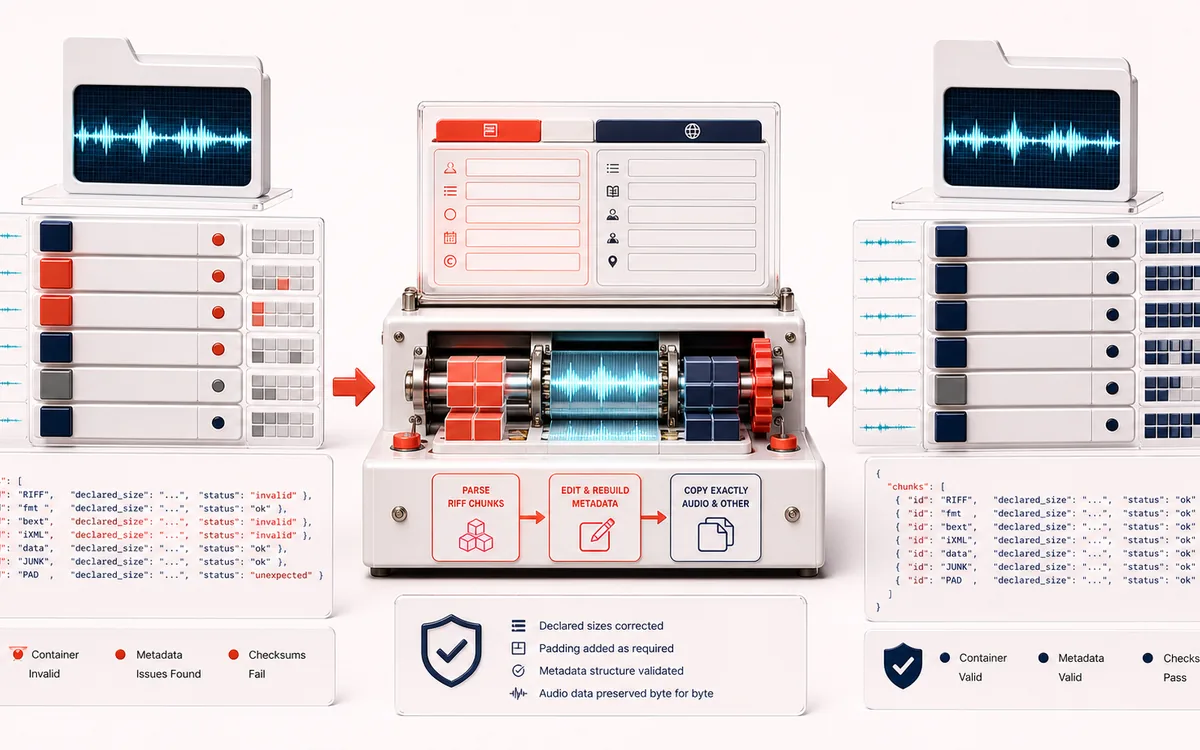
FILE STRUCTURE MAP
Broadcast Chunk Map
Inspect raw RIFF chunks before changing delivery metadata. The chunk map separates original fmt/data bytes from editable bext, INFO and iXML. Literal metadata stays text, and export waits for a verified build of the current WAVE.
Open the full signal breakdownCurrent WAVE, byte preservation and recipient checks
- Broadcast WAV file
Start with the right material
Adding production descriptions, originator data, time reference, coding history and machine-readable project metadata to PCM or floating-point WAV deliveries.
- Edit RIFF metadata
Understand the transformation
The current RIFF chunk table is parsed without audio decoding. Metadata is displayed as literal text; a verified rebuild copies fmt, data and untouched raw chunks, while a new source selection retires old downloads.
- Preserved BWF
Verify the usable result
Visible chunk map and metadata validation plus an updated WAV and structured JSON chunk manifest.
Where this workflow stops
Support is limited to ordinary RIFF/WAVE files within browser memory limits. RF64, Wave64, compressed WAV variants and vendor-specific metadata semantics may require dedicated broadcast software.
Verify structure, fields and the receiving app
- After selecting another WAVE, wait for that file; previous downloads are no longer current.
- Build after your last field edit and inspect fmt/data/unknown exact plus the metadata before/after diff.
- Keep the original, inspect WAV and JSON in the receiving workflow, and check playback separately; XML syntax is not vendor-schema validation.
- RIFF-level visibility
- See chunk ids, offsets, sizes, padding, hashes and hex previews instead of treating a Broadcast Wave as an opaque audio file.
- Production metadata
- Edit bext identifiers and 64-bit sample time reference, common INFO descriptions and an entire syntactically validated iXML document.
- Verified preservation
- fmt, audio data and untouched chunks are copied from original byte ranges and compared before WAV or JSON export becomes available.
How to edit Broadcast Wave metadata online
- Open a local PCM or IEEE float RIFF/WAVE file, or generate the archive demo. Wait for the current source; a newer selection retires old downloads. Cancel file read or Retry selected file resolves an unfinished read.
- Review the current chunk map: identifiers, sizes, padding, hashes and short hex previews separate the raw audio and format data from editable metadata.
- Edit bext, INFO and iXML; validate fixed field lengths, the unsigned 64-bit sample time reference, UMID and XML syntax. Metadata is shown as literal text, not executed HTML.
- Build after the last field edit, inspect fmt/data/unknown exact and the before/after diff, then download the current WAV and JSON manifest. Keep the original and inspect both in the receiving workflow.
Broadcast Wave metadata, not MP3 ID3 tags
The existing Metadata Editor edits ID3 frames attached to MP3 audio. BWF Metadata Editor works inside RIFF/WAVE: the Broadcast Audio Extension (`bext`), `LIST/INFO` subchunks and raw `iXML`. It never converts these structures into ID3 or decodes the audio payload.
What byte-preserving means here
The file is parsed into bounded RIFF chunks. Edited metadata chunks are rebuilt with corrected declared sizes and even-byte padding. The original raw bytes for `fmt `, every `data` chunk and every untouched or unknown chunk are carried forward and compared after reparsing the output. Missing edited metadata is inserted immediately after the first `fmt ` chunk in a deterministic order.
Supported boundary
This tool accepts PCM and IEEE float RIFF/WAVE, including the corresponding WAVE_FORMAT_EXTENSIBLE subformats. It deliberately refuses RF64, Wave64, compressed WAVE codecs, truncated chunks and malformed sizes. Files approaching RIFF's 4 GiB limit are outside the browser and container safety boundary.
Privacy: selected WAVE bytes remain in this browser. Parsing, XML validation, rebuilding, hashing and download preparation happen on this device.
BWF Metadata Editor: quick answer and technical limits
Quick answer: A local RIFF/WAVE inspector and editor for Broadcast Wave bext, iXML and LIST/INFO metadata that preserves the source audio chunk during export.
- Best for
- Adding production descriptions, originator data, time reference, coding history and machine-readable project metadata to PCM or floating-point WAV deliveries.
- How it works
- The current RIFF chunk table is parsed without audio decoding. Metadata is displayed as literal text; a verified rebuild copies fmt, data and untouched raw chunks, while a new source selection retires old downloads.
- What you get
- Visible chunk map and metadata validation plus an updated WAV and structured JSON chunk manifest.
Know before you use it: Support is limited to ordinary RIFF/WAVE files within browser memory limits. RF64, Wave64, compressed WAV variants and vendor-specific metadata semantics may require dedicated broadcast software.
Privacy: Selected audio is processed in this browser and is not uploaded to AudioWrench. Normal page assets can still be requested as described in the privacy notice. Privacy details →