FLAC Cover Art Editor.
Add or change one JPEG or PNG front cover in a single FLAC or 2–50 files at once — locally, without re-encoding audio.
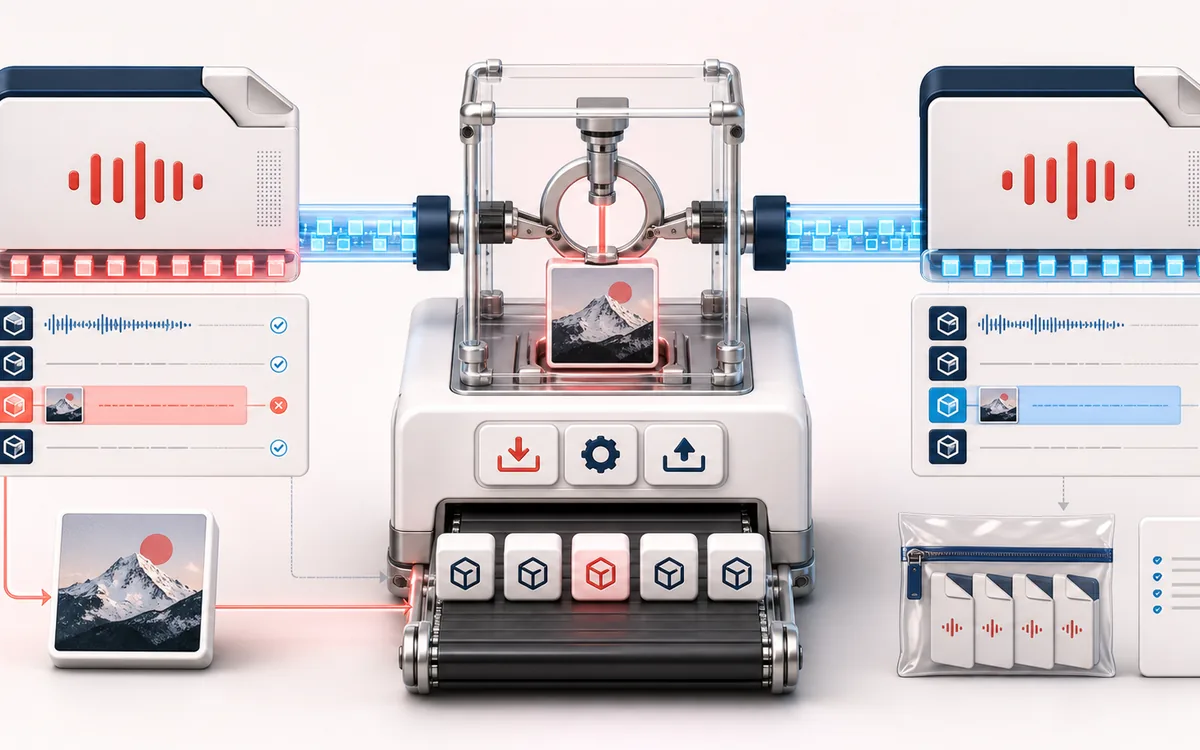
FILE STRUCTURE MAP
FLAC Artwork Panel
Choose current artwork without transcoding FLAC audio. A decoded JPEG/PNG replaces the type-3 front cover only after its read succeeds. Back artwork, comments and encoded FLAC frames are retained in a single file or current batch ZIP.
Open the full signal breakdownCurrent cover, exact metadata limits and ZIP checks
- FLAC and image
Start with the right material
Adding one JPEG or PNG front cover across a FLAC delivery without transcoding the music.
- Embed or extract art
Understand the transformation
The page waits for the current source and validated JPEG/PNG, replaces only type-3 front-cover PICTURE blocks, retains other metadata payloads and encoded audio, and builds a current single FLAC or sequential STORE ZIP with a manifest.
- Artwork-ready FLAC
Verify the usable result
One edited FLAC, an extracted image, or one ZIP containing every accepted FLAC plus a machine-readable manifest.
Where this workflow stops
Single-file input is capped at 48 MiB on mobile or 128 MiB on desktop. Batch input is capped at 64 MiB or 160 MiB respectively, with the same per-file limits and separate peak-memory guards; malformed files are rejected and each FLAC metadata block must fit the 16 MiB format limit.
Verify artwork, manifest and the target player
- Wait for the new cover to validate; single-file and batch exports are unavailable while it reads.
- Inspect the saved file in the intended player: front cover changed, other artwork and comments retained.
- Unzip a batch, compare the manifest file mapping and cover properties, and keep the original FLAC files.
- Input
- One FLAC, or a batch of 2–50 valid .flac files, plus one decodable JPEG or PNG cover.
- Batch output
- A STORE ZIP with uniquely named FLAC files and flac-cover-art-batch-manifest.json.
- Preservation
- Non-front artwork, other metadata-block payloads and encoded audio bytes are copied byte-for-byte.
How to add one cover to multiple FLAC files
- Choose Batch add/change cover and select 2–50 .flac files. Wait for the browser to scan each current metadata chain locally.
- Review every file status and remove rejected or malformed rows before export. Confirm the accepted queue is the delivery you intend.
- Choose one JPEG or PNG and wait for its current filename and decoded dimensions. Export is unavailable while a newer cover reads; Retry or choose another image if validation fails.
- Download the STORE ZIP with uniquely named FLAC outputs and flac-cover-art-batch-manifest.json. Unpack it, compare the current cover and file mapping, and inspect artwork and playback in the intended player.
How it works: the editor validates each FLAC metadata chain, replaces only valid PICTURE blocks whose picture type is 3, keeps all other metadata payloads in source order and appends the original encoded audio payload unchanged. Multiple old front covers become one selected front cover.
Honest limits: single-file mode accepts up to 48 MiB on mobile or 128 MiB on desktop. Batch mode accepts 2–50 files, up to 64 MiB total input on mobile or 160 MiB on desktop, with the same per-file limits and a separate conservative 256 MiB / 512 MiB peak-memory preflight. The complete PICTURE block must be smaller than 16 MiB. Malformed files are rejected rather than repaired.
FLAC Cover Art: quick answer and technical limits
Quick answer: A single-file and 2-to-50-file FLAC front-cover editor that preserves the encoded audio and unrelated metadata byte for byte.
- Best for
- Adding one JPEG or PNG front cover across a FLAC delivery without transcoding the music.
- How it works
- The page waits for the current source and validated JPEG/PNG, replaces only type-3 front-cover PICTURE blocks, retains other metadata payloads and encoded audio, and builds a current single FLAC or sequential STORE ZIP with a manifest.
- What you get
- One edited FLAC, an extracted image, or one ZIP containing every accepted FLAC plus a machine-readable manifest.
Know before you use it: Single-file input is capped at 48 MiB on mobile or 128 MiB on desktop. Batch input is capped at 64 MiB or 160 MiB respectively, with the same per-file limits and separate peak-memory guards; malformed files are rejected and each FLAC metadata block must fit the 16 MiB format limit.
Public browser workflow evidence
Question: Can the tool add a front-cover picture while preserving the compressed FLAC audio payload byte for byte?
Observed result: The exported FLAC contained a type-3 front-cover picture and retained the original compressed audio payload byte for byte.
Evidence boundary: The fixture covers one valid FLAC structure and one front-cover replacement path, not every malformed or unusual metadata layout.
Network observation: No audio-payload or cross-origin requests were observed during this published workflow.
Privacy: Selected audio is processed in this browser and is not uploaded to AudioWrench. Normal page assets can still be requested as described in the privacy notice. Privacy details →