Online Noise Gate
Reduce quiet room tone, hiss and handling noise between phrases with an adjustable RMS gate. Tune threshold, hysteresis, attack, hold, release, range and stereo link, then preview the complete local render and export WAV or MP3.
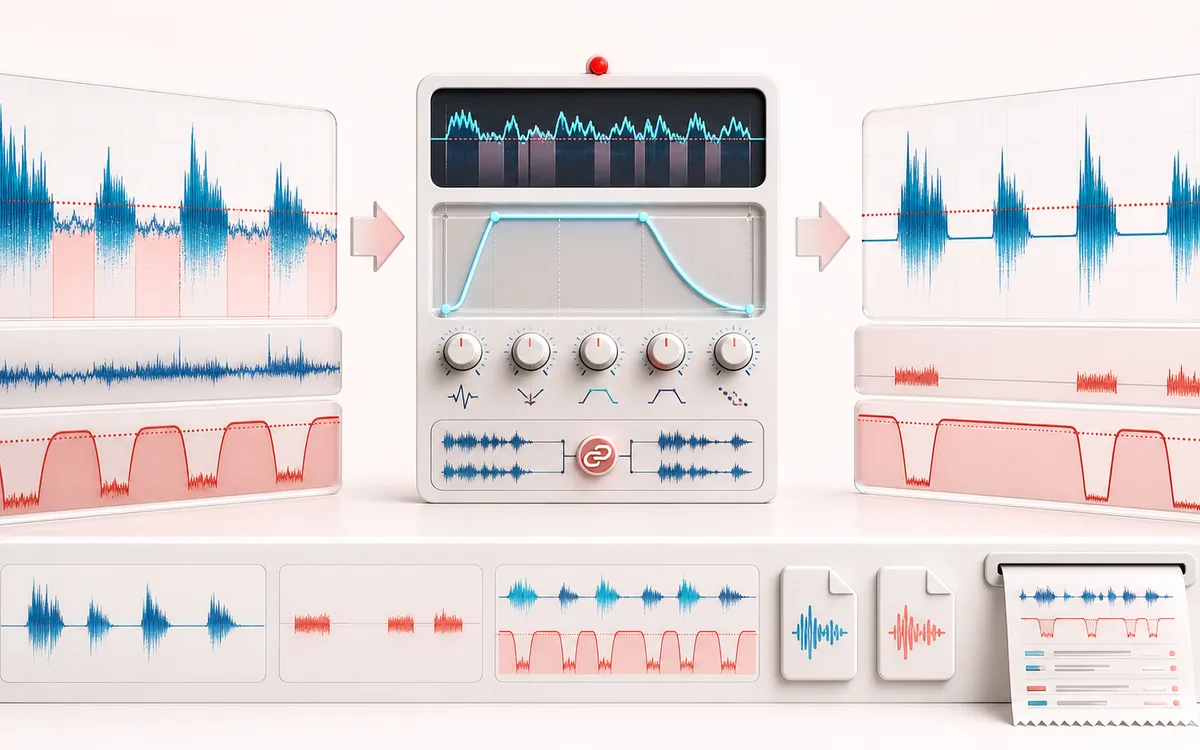
DYNAMICS MAP
Gate State Envelope
Follow the level decision, not just the waveform. The important story is how the detector reacts, where gain starts moving and whether the result stays controlled without flattening the performance.
Open the full signal breakdownBest source, processing logic, limits and three-pass listening check
- Noisy pauses
Start with the right material
Reducing room tone between spoken phrases, cleaning pauses in close-mic recordings and controlling low-level bleed without deleting time.
- Attenuate below threshold
Understand the transformation
An RMS detector drives a smoothed gain envelope with threshold hysteresis plus attack, hold, release and maximum-attenuation controls; optional stereo linking keeps both channels on one gate state.
- Gated recording
Verify the usable result
A full-duration processed preview, an isolated removed-signal preview, WAV/MP3 export and a receipt for gate activity, attenuation, exact frames, peaks and settings.
Where this workflow stops
A noise gate does not remove noise while wanted speech or music is present, identify speakers or repair clipped audio. Aggressive thresholds and timing can cut quiet syllables or create audible pumping.
Make the final decision by ear
- Compare at matched loudness so “louder” is not mistaken for “better”.
- Inspect the loudest transient and the quietest useful detail.
- Leave enough headroom for the next processing or delivery stage.
- Input
- One voice, vocal, instrument or mixed audio file in a format your current browser can decode.
- Controls
- Open threshold, close hysteresis, attack, hold, release, maximum attenuation and stereo-channel linking.
- Output
- A processed full-file preview, removed-signal preview, WAV or MP3 download and measured gate receipt.
How to gate background noise from audio online
- Select a recording with quiet gaps and wanted speech, vocals or instrument passages.
- Set the open threshold above the noise floor but below the quietest wanted phrase.
- Use hysteresis and hold to stop chatter, then shape the opening and closing with attack and release.
- Choose a moderate range, process the full file, inspect the receipt and audition both the result and removed signal.
Quick answer: this online noise gate measures a causal 10 ms trailing RMS level and applies a smoothed gain envelope. It is deterministic conventional DSP, not AI noise removal, speech recognition or source separation.
How a noise gate differs from noise removal
A gate is a level-dependent control. When measured audio rises above the open threshold it fades toward full level. When it remains below the lower close threshold for the hold time, it fades toward the chosen maximum attenuation. This can clean pauses without processing every loud phrase.
The tradeoff is important: a gate cannot know whether a quiet sound is unwanted hiss or a wanted breath, consonant, reverb tail or soft note. Noise that exists underneath loud speech stays underneath it because the gate is open. For continuous noise during speech, try Noise Remover; for frequency-specific harsh consonants, use the Online De-Esser.
What each gate control changes
- Open threshold
- The RMS level required to open a closed gate. Too high can miss quiet words; too low may leave the gate open through room tone.
- Hysteresis
- Places the close threshold below the open threshold. The gap prevents repeated open-close chatter around one level.
- Attack
- Controls the fade from closed range toward unity after the detector opens. Short values preserve transients; extreme values can sound abrupt.
- Hold
- Requires the level to remain below the close threshold before release begins, preserving short pauses inside words and notes.
- Release
- Controls the fade toward the closed range. A longer release often keeps word endings and ambience more natural.
- Maximum attenuation
- Sets the closed floor from no reduction at 0 dB to strong reduction at 80 dB. Gentle expansion can sound more natural than full silence.
- Stereo link
- Shares one detector and gain across channels to protect stereo position. Independent mode can treat asymmetric channels differently.
Measured evidence for the complete file
The processing receipt reports gate-open share, maximum and average attenuation, exact output frames, sample rate, channel count, duration, output peak, clipping status and the settings used. The result and removed-signal buffers keep the same decoded duration and channel layout as the source.
Listen to what was removed: if the difference preview contains important word endings, breaths or instrument tails, lower the threshold, increase hold or release, or reduce the maximum attenuation.
Useful noise-gate workflows
- Podcast pauses: lower a stable room floor between spoken phrases before loudness normalization.
- Voiceover edits: reduce headphone bleed or computer fan noise in clean gaps without uploading the recording.
- Guitar and bass: control pickup hum between notes while using hold and release to retain sustain.
- Drum close microphones: reduce spill in quiet gaps while preserving attacks with a short opening time.
Limits to understand before exporting
- No automatic noise identification: this gate follows RMS level only and does not learn or classify the unwanted sound.
- Overlapping noise remains: when wanted audio opens the gate, background noise passes with it.
- Quiet detail is vulnerable: wanted content below the threshold can be attenuated just like noise.
- Causal detector timing: the trailing RMS window reacts after energy arrives. Attack, hold and release add their chosen envelope behavior.
- Full-file memory use: decoded source, result and difference audio occupy device memory. Unsafe additional PCM work is refused before allocation.
- Browser codec behavior: support varies and the browser may decode or resample a source. WAV and MP3 are new local renders, not untouched container edits.
Privacy: selected audio is processed in this browser and is not uploaded to AudioWrench. Normal page assets and same-origin encoder code can still be requested as described in the privacy notice.
Online Noise Gate: quick answer and technical limits
Quick answer: A local conventional-DSP gate that follows signal level and lowers audio below a closing threshold while opening above a separate threshold.
- Best for
- Reducing room tone between spoken phrases, cleaning pauses in close-mic recordings and controlling low-level bleed without deleting time.
- How it works
- An RMS detector drives a smoothed gain envelope with threshold hysteresis plus attack, hold, release and maximum-attenuation controls; optional stereo linking keeps both channels on one gate state.
- What you get
- A full-duration processed preview, an isolated removed-signal preview, WAV/MP3 export and a receipt for gate activity, attenuation, exact frames, peaks and settings.
Know before you use it: A noise gate does not remove noise while wanted speech or music is present, identify speakers or repair clipped audio. Aggressive thresholds and timing can cut quiet syllables or create audible pumping.
Privacy: Selected audio is processed in this browser and is not uploaded to AudioWrench. Normal page assets can still be requested as described in the privacy notice. Privacy details →