Online Plosive Remover — Reduce P-Pops in Audio
Detect short low-frequency microphone bursts, inspect each marker and reduce only the affected low band. Compare Original, Processed and Difference before exporting WAV or MP3.
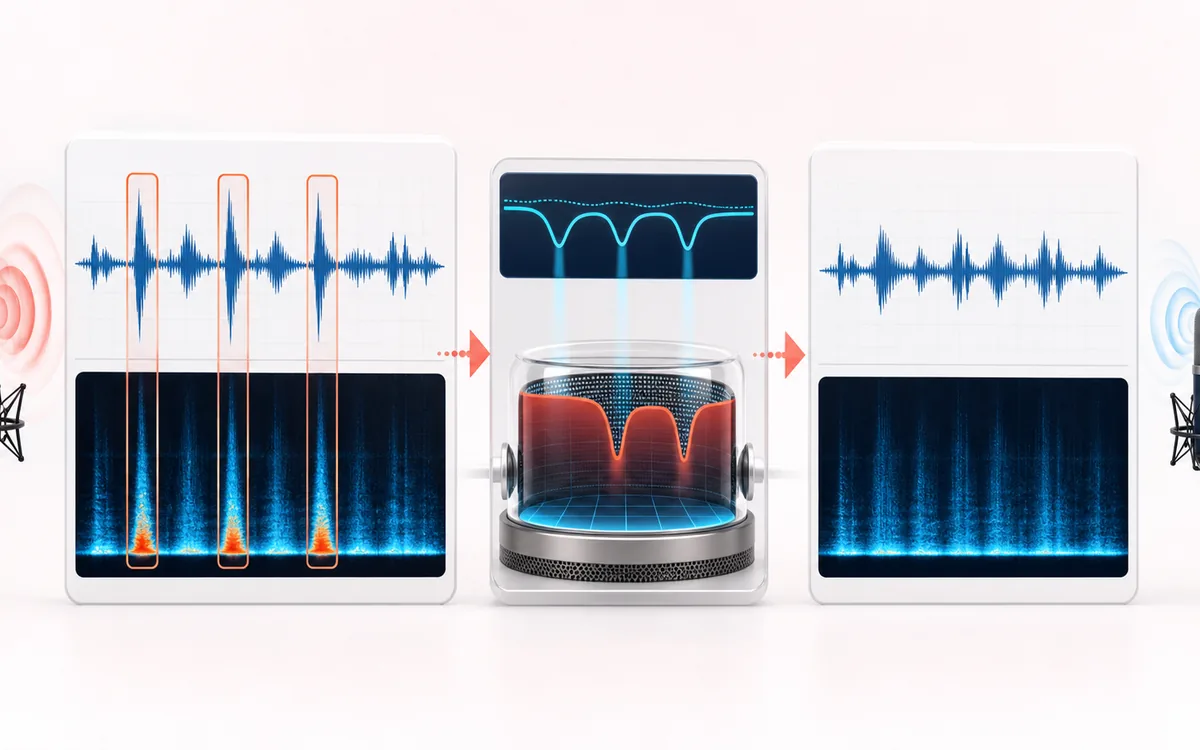
RESTORATION MAP
Plosive Event Map
Separate the damaged event from healthy context. A repair is safest when the affected span is narrow, the surrounding signal is trustworthy and the difference audition contains mostly the defect.
Open the full signal breakdownBest source, processing logic, limits and three-pass listening check
- Popped microphone take
Start with the right material
Close-mic speech with isolated P and B pops that briefly overload the low end while the rest of the voice remains usable.
- Reduce low bursts
Understand the transformation
A short-window detector compares low-frequency burst energy with the local broadband envelope, then smooths a temporary low-band attenuation across each accepted event.
- Plosive-safe speech
Verify the usable result
Reviewable event markers, Original/Processed/Difference audition and a full-duration WAV or MP3 with the selected plosive reduction.
Where this workflow stops
It cannot reconstruct a severely overloaded microphone recording. Bass notes, handling noise and proximity changes can resemble plosives, so markers and the difference audition need review.
Make the final decision by ear
- Review every detected event near drums, consonants and other sharp attacks.
- Use Difference audition to hear what the repair removes or invents.
- Prefer several small repairs over one aggressive global pass.
- Best for
- Short P-pop and B-pop thumps in dialogue, podcasts, voiceovers and close-mic vocals.
- Controls
- Sensitivity, low-frequency corner, reduction strength, maximum burst duration and edge smoothing.
- Output
- Event markers, a measured full-file result, three audition signals, plus a local WAV or MP3 render.
How to remove plosives from audio online
- Load a recording. Choose dialogue or vocals with audible low thumps around P and B consonants. The file stays in this browser.
- Start with the defaults. Sensitivity controls how readily low-frequency onsets trigger. The corner determines which low band is analyzed and attenuated.
- Find and reduce plosives. The tool analyzes the complete decoded file, then shows a count, timeline markers and an event list with exact times and durations.
- Listen critically. Compare Original and Processed. Difference reveals what was removed, but it is not a perfectly isolated plosive stem.
- Export a new render. Download WAV for an uncompressed PCM render or MP3 for a smaller lossy copy.
Quick answer: this tool detects sudden low-frequency energy that is stronger than both the voice/body band and the local low-frequency baseline. A candidate must also end within the selected maximum duration. Only accepted event windows receive low-band attenuation.
What causes vocal P-pops?
Speech plosives are pressure bursts produced when airflow is briefly blocked and released, especially on consonants such as P and B. A microphone placed directly in that airflow can capture a large low-frequency excursion that is much stronger than the useful voice at that moment. Distance, angle, capsule type, wind protection and room setup all change the result.
A pop filter and slightly off-axis microphone placement are usually the best prevention. Software works after the event and cannot perfectly separate a burst from useful vocal energy occupying the same frequencies. This processor therefore applies a bounded correction and exposes its markers instead of claiming to reconstruct a clean recording.
How the detector avoids a permanent low-cut
The low-frequency corner creates an offline analysis split. A fast low-band envelope is compared with the complementary body band and a slower low-band baseline. A strong onset can become a candidate, but the candidate is discarded if it lasts longer than the maximum burst duration. This helps reject steady bass and mains hum.
For each accepted event, the low-frequency component is reduced by no more than the chosen strength and recombined with the untouched complementary component. Edge smoothing fades that change around the marker. Where the event mask is zero, the decoded input samples are copied unchanged. The result is dynamic event correction, not a high-pass filter placed across the entire recording.
What each control changes
- Sensitivity
- Raises or lowers detector strictness. High sensitivity can find subtler bursts but may also mark handling noise, kick drums or other low transients.
- Low-frequency corner
- Defines the detector and attenuation split. A higher corner catches broader thumps but can involve more useful vocal body.
- Reduction strength
- Caps low-band attenuation inside an accepted event. Start moderately; excessive reduction can make syllables sound thin.
- Maximum burst duration
- Rejects candidates that remain active too long. Shorter settings are stricter against sustained bass and hum; settings that are too short can miss broad pops.
- Edge smoothing
- Applies cosine fades around each mask. More smoothing can avoid abrupt changes, but very long edges affect more surrounding audio.
Plosive Remover vs De-Esser, Hum Remover and Declipper
- Plosive Remover
- Targets brief low-frequency pressure bursts and applies dynamic low-band attenuation only at accepted markers.
- De-Esser
- Targets high-frequency S, SH and related sibilant energy. It is the opposite end of the vocal spectrum and does not solve a low P-pop.
- Hum Remover
- Targets continuous 50 or 60 Hz mains tones and harmonics. A duration gate intentionally rejects that sustained behavior here.
- Audio Declipper
- Attempts to repair flattened clipped peaks. Plosive Remover can soften a low burst but does not reconstruct samples lost to clipping.
How to use the event markers and Difference audition
A visible marker means the detector accepted a short low-frequency event; it does not prove that a speaker produced a P or B. Check the marker time against the original recording. If markers land on kick drums, desk knocks or intentional bass, lower sensitivity, lower the corner or shorten the maximum duration.
Difference plays original minus processed. With this method it contains low-frequency material removed inside smoothed event windows. Hearing a little voice or room movement in Difference is normal because useful sound can overlap the same band. Judge success from the Processed signal in context, not from making Difference sound large.
Limits and safe local processing
- Not semantic recognition: the detector measures signal behavior. Short bass hits, microphone bumps and wind can look similar to a plosive.
- No perfect separation: useful voice and the burst may overlap. Strong settings can thin the syllable.
- No clipping repair: if the burst clipped the converter, use a declipper as a separate step and expect limits.
- Browser memory: complete-file PCM analysis needs substantially more memory than the compressed input file. Oversized or longer-than-30-minute jobs are refused before work buffers are allocated.
- Codec support varies: the browser decodes the source and may resample it. The output is a new PCM or MP3 render, not an untouched container edit.
- WAV and MP3 differ: WAV is larger and avoids another lossy encoding stage. MP3 is a local lossy re-encode.
- Rights still apply: edit and distribute only audio you own or have permission to use.
Privacy: selected audio is decoded, analyzed and rendered in this browser and is not uploaded to AudioWrench. Normal page assets and same-origin encoder code can still be requested as described in the privacy notice.
Online Plosive Remover: quick answer and technical limits
Quick answer: A focused dialogue repair tool that detects short low-frequency microphone bursts and applies bounded low-band reduction only around those events.
- Best for
- Close-mic speech with isolated P and B pops that briefly overload the low end while the rest of the voice remains usable.
- How it works
- A short-window detector compares low-frequency burst energy with the local broadband envelope, then smooths a temporary low-band attenuation across each accepted event.
- What you get
- Reviewable event markers, Original/Processed/Difference audition and a full-duration WAV or MP3 with the selected plosive reduction.
Know before you use it: It cannot reconstruct a severely overloaded microphone recording. Bass notes, handling noise and proximity changes can resemble plosives, so markers and the difference audition need review.
Privacy: Selected audio is processed in this browser and is not uploaded to AudioWrench. Normal page assets can still be requested as described in the privacy notice. Privacy details →