Vocal Breath Remover
Find likely breaths between vocal phrases, turn down only the events you approve and keep every sample in its original place. Compare the processed signal and difference before exporting.
RESTORATION MAP
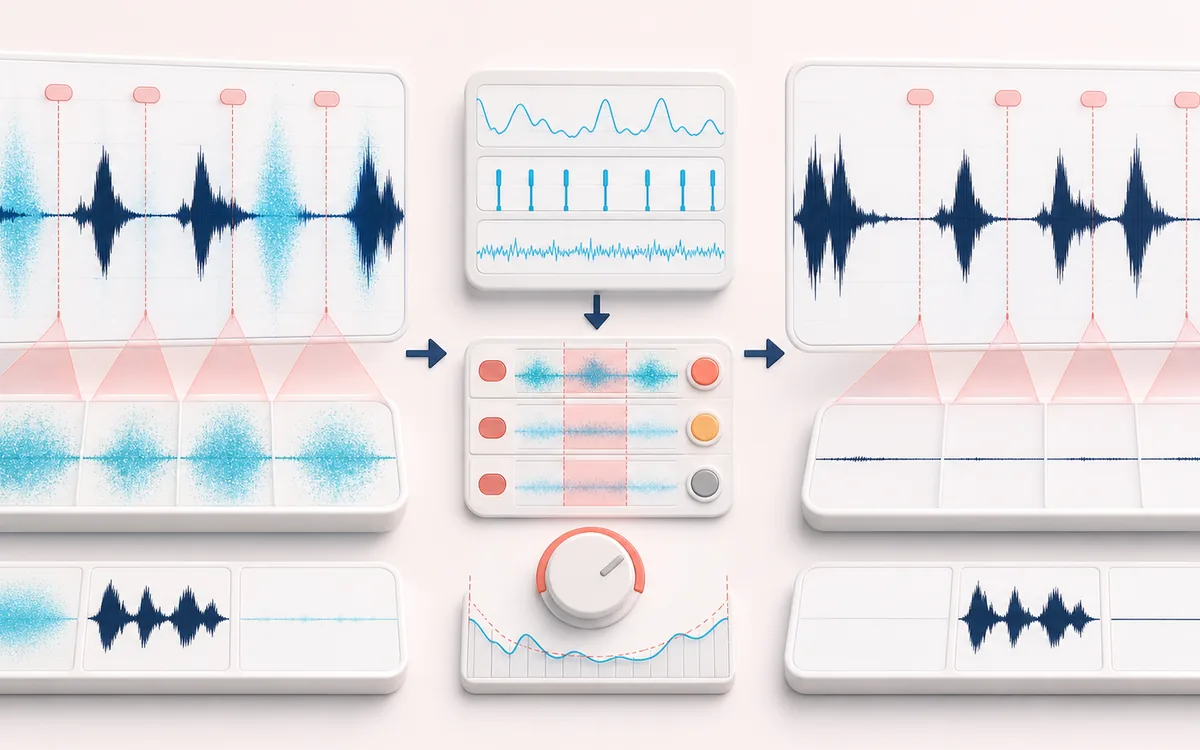
Breath Attenuation Map
Separate the damaged event from healthy context. A repair is safest when the affected span is narrow, the surrounding signal is trustworthy and the difference audition contains mostly the defect.
Open the full signal breakdownBest source, processing logic, limits and three-pass listening check
- Breathy vocal take
Start with the right material
Narration, audiobooks, voiceovers and podcast tracks where inhalations are distracting but natural timing and room tone should remain.
- Lower breath events
Understand the transformation
Short-window level, zero-crossing and high-frequency noisiness distinguish bounded breath candidates from voiced regions; accepted events receive smoothed attenuation with a room-tone floor.
- Tighter vocal
Verify the usable result
Editable breath markers, Original/Processed/Difference audition and a WAV or MP3 with the chosen breath reduction and unchanged duration.
Where this workflow stops
Whispering, fricatives, rustle and noisy rooms can resemble breaths. This is guided signal processing rather than speech understanding, so review false positives before export.
Make the final decision by ear
- Review every detected event near drums, consonants and other sharp attacks.
- Use Difference audition to hear what the repair removes or invents.
- Prefer several small repairs over one aggressive global pass.
- Detection
- Combines short-window RMS with high-frequency noise energy and zero-crossing behavior, then requires voiced context on both sides.
- Treatment
- Attenuates approved events in place with bounded edge fades and an absolute room-tone floor.
- Output
- Original, Processed and Difference previews plus same-duration WAV or MP3 exports.
How to remove breaths from vocals online
- Load a dry vocal, narration, audiobook or podcast recording, or try the deterministic synthetic demo.
- Set detection sensitivity and the shortest and longest expected breath. Review each waveform marker and disable anything that is speech, a sibilant or an intentional sound.
- Choose the reduction in dB, a short edge fade and the lowest room-tone level the edit should preserve, then select Apply reduction.
- Switch among Original, Processed and Difference. Listen to the complete result, then download WAV or MP3.
Honest limit: this is a signal detector, not a speech-understanding model. Quiet consonants, lip noise, clothing movement and hiss can resemble a breath; breaths overlapping a word, music or reverb may be missed. The Difference monitor helps reveal what changed, but it does not prove the edit is perceptually clean.
What the detector measures
The analysis first finds stable voiced phrases from their local RMS context. It examines the gaps between those phrases for events that are quieter than the surrounding voice but louder than the estimated room floor. A high-frequency energy ratio and zero-crossing rate favor turbulent, noise-like breath energy over quiet tonal material. Sensitivity relaxes or tightens these tests; it does not identify words or understand performance intent.
Enabled regions are multiplied by a smooth gain envelope. Reduction controls the maximum attenuation. Preserve room tone limits that attenuation so a breath is not pushed below the selected absolute floor, which can otherwise create an unnatural hole. The algorithm does not cut, stretch, move or spectrally subtract audio.
Breath Remover versus similar audio tools
- Vocal Breath Remover
- Detects short noise-like events between voiced phrases and reduces approved markers without changing duration.
- Silence Remover
- Finds longer low-level gaps and removes time to tighten pacing. Use it when the goal is a shorter edit.
- Noise Gate
- Attenuates material whenever its level crosses gate rules. It is useful for broad cleanup, but it does not require breath-like noisiness between phrases.
- Noise Remover
- Estimates more continuous background noise and reduces it spectrally across the recording. It is not a short-event breath editor.
Settings that protect a natural vocal
- Start gently: try 12–18 dB of reduction instead of complete muting. Real breaths often carry timing and emotion.
- Keep duration narrow: typical short inhales are easier to separate from pauses and phrases than very broad duration ranges.
- Use edge fades: 8–20 ms can soften abrupt gain changes, though a fade cannot repair a wrong marker.
- Preserve ambience: set the floor near the audible room tone so the gap does not become unnaturally empty.
- Check Difference: strong vowels or consonants in the difference are a warning to disable that event or lower sensitivity.
Privacy and format note: selected audio stays in this browser. WAV is a new PCM render of browser-decoded audio; MP3 is a lossy local re-encode. Browser decoding may resample the source, and long or multichannel files can exceed device memory.
Vocal Breath Remover: quick answer and technical limits
Quick answer: A full-duration vocal editor that detects noise-like breaths between voiced phrases and turns them down without deleting time.
- Best for
- Narration, audiobooks, voiceovers and podcast tracks where inhalations are distracting but natural timing and room tone should remain.
- How it works
- Short-window level, zero-crossing and high-frequency noisiness distinguish bounded breath candidates from voiced regions; accepted events receive smoothed attenuation with a room-tone floor.
- What you get
- Editable breath markers, Original/Processed/Difference audition and a WAV or MP3 with the chosen breath reduction and unchanged duration.
Know before you use it: Whispering, fricatives, rustle and noisy rooms can resemble breaths. This is guided signal processing rather than speech understanding, so review false positives before export.
Privacy: Selected audio is processed in this browser and is not uploaded to AudioWrench. Normal page assets can still be requested as described in the privacy notice. Privacy details →