Transient Slicer
Find the hits inside a drum or percussion recording, refine every boundary, name and audition the chops, then export individual WAV files or one organized ZIP with JSON and CSV manifests.
TIMELINE MAP
Onset Slice Lane
Turn one long waveform into deliberate boundaries. The visual emphasizes the selection, transition and resulting edit so that timing decisions remain obvious before anything is rendered.
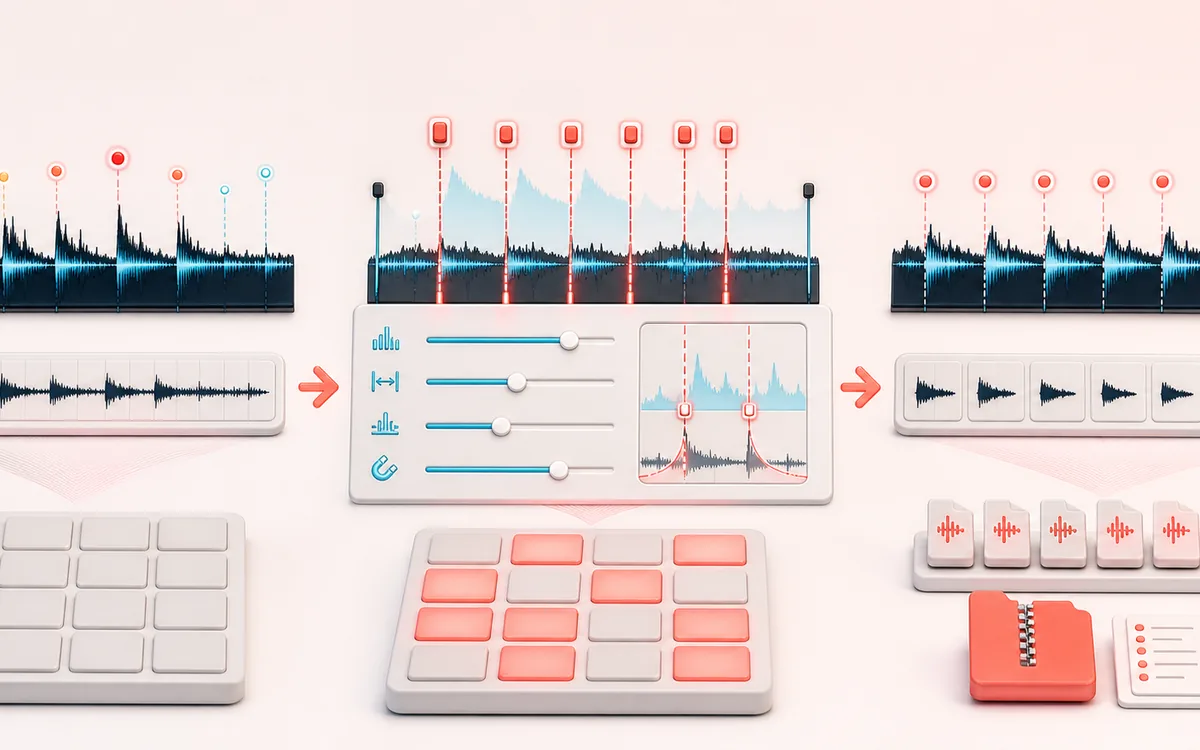
Open the full signal breakdownBest source, processing logic, limits and three-pass listening check
- Percussive recording
Start with the right material
Chopping drum breaks, percussion, picked instruments and other attack-led recordings into named samples ready for a sampler, beat maker or manual rearrangement.
- Detect and edit slices
Understand the transformation
A bounded spectral-flux onset detector applies sensitivity, minimum-gap, pre-roll and snap settings before editable markers define non-overlapping source ranges with optional edge fades.
- Ordered samples
Verify the usable result
Auditionable named slices plus individual WAV downloads or one local ZIP with a JSON or CSV boundary manifest for the complete ordered chop.
Where this workflow stops
Soft entrances, dense mixes and steady tones may produce missed or false onsets. Unlike Audio Splitter it is attack-led, and unlike Transient Shaper it cuts clips instead of changing attack or sustain gain.
Make the final decision by ear
- Zoom into every boundary and listen across it, not only inside it.
- Leave intentional handles when another editor will continue the work.
- Verify exact duration and ordering after the final render.
- Detector
- Bounded multiband energy-flux onset proposals with sensitivity and minimum-gap controls.
- Marker contract
- Ordered shared boundaries cover every decoded source frame exactly once, with no gaps and no overlap.
- Output
- Selected-slice WAV plus a local STORE ZIP containing all accepted WAVs and matching JSON and CSV manifests.
How to chop a sample by transients
- Load one drum loop, percussion performance or chain of one-shots. You can generate the deterministic demo to learn the desk first.
- Set sensitivity and minimum gap. Add a little pre-roll when you want to preserve breath before each hit; enable zero-crossing snap to reduce hard discontinuities.
- Run detection, then inspect the waveform and accessible slice list. Click the waveform to add a marker, or enter exact seconds. Move or delete internal markers without changing the fixed start and end boundaries.
- Select each slice, give it a useful filename, audition it, and uncheck anything you do not want in the pack.
- Export one selected WAV or download the accepted pack. The ZIP includes ordered WAV files plus JSON and CSV manifests with exact frame and time boundaries.
What the detector measures
The onset pass compares positive frame-to-frame energy change in three complementary views: overall level, slower grouped energy and rapid sample difference. It combines those normalized changes into a multiband flux curve, applies a robust local threshold, keeps local peaks, and enforces the selected minimum gap. This is a transient proposal system—not a promise that every musical note has been understood.
Sensitivity changes the adaptive threshold. Minimum gap prevents dense retriggers. Pre-roll moves proposed internal boundaries earlier, and zero-crossing snap searches a short bounded neighborhood for a quieter cut. These controls do not alter the decoded source.
Exact slice coverage and edge fades
Frame zero and the decoded end are fixed. Every internal boundary is both the exclusive end of one slice and the inclusive start of the next. The complete ordered slice list therefore covers the source exactly once. Optional edge fades are applied to the exported samples inside each region; they never move markers, crossfade neighboring regions or change manifest boundaries.
Known limits
- Heavily limited full mixes, sustained material, long reverb tails and soft legato entrances can produce weak or ambiguous energy rises.
- A very high sensitivity can promote small fluctuations. A very low sensitivity can miss softer hits after loud ones.
- The detector is capped at 64 slices. Raise the minimum gap or edit a shorter source if the material is too dense.
- ZIP uses the uncompressed STORE method for a compact dependency-free implementation. WAV audio is already large, so the archive prioritizes predictable local packaging over compression ratio.
Privacy: selected audio is decoded, analyzed and packaged in this browser and is not uploaded to AudioWrench. Normal page assets can still be requested when the page loads. Downloads are generated locally.
Transient Slicer: quick answer and technical limits
Quick answer: An onset-based sample chopper that detects percussive attacks, turns them into editable slice boundaries and exports the resulting ordered clips without changing their timing inside each slice.
- Best for
- Chopping drum breaks, percussion, picked instruments and other attack-led recordings into named samples ready for a sampler, beat maker or manual rearrangement.
- How it works
- A bounded spectral-flux onset detector applies sensitivity, minimum-gap, pre-roll and snap settings before editable markers define non-overlapping source ranges with optional edge fades.
- What you get
- Auditionable named slices plus individual WAV downloads or one local ZIP with a JSON or CSV boundary manifest for the complete ordered chop.
Know before you use it: Soft entrances, dense mixes and steady tones may produce missed or false onsets. Unlike Audio Splitter it is attack-led, and unlike Transient Shaper it cuts clips instead of changing attack or sustain gain.
Privacy: Selected audio is processed in this browser and is not uploaded to AudioWrench. Normal page assets can still be requested as described in the privacy notice. Privacy details →