Audio Splitter & MP3 Chunker Online.
Split MP3, WAV and other browser-decodable audio by exact timestamps, equal parts, fixed duration or measured silence — then preview, rename and export the chosen chunks locally.
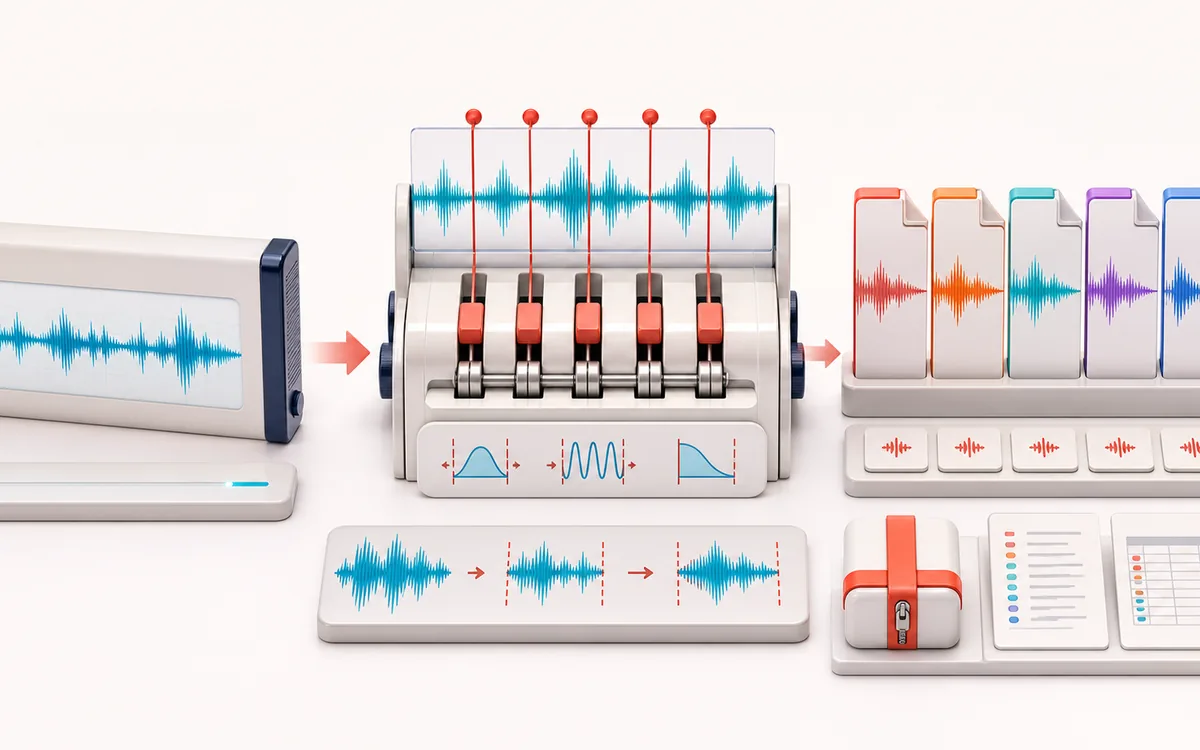
FILE STRUCTURE MAP
Chunk Delivery Map
Follow audio, metadata and delivery as separate layers. Container work is easier to trust when decoded audio, editable fields and the final export are shown as distinct stages with explicit preservation limits.
Open the full signal breakdownBest source, processing logic, limits and three-pass listening check
- Single long file
Start with the right material
Podcast chapters, lecture sections, DJ mix tracks, sample-pack slices and long recordings that need multiple individually named deliverables.
- Divide by markers
Understand the transformation
Requested boundaries normalize to exact decoded frames, optional silence and zero-crossing logic adjusts them within declared bounds, and short edge fades can reduce cut clicks before sequential encoding.
- Named audio parts
Verify the usable result
Previewable segments, individual WAV/MP3 files, a local ZIP and JSON/CSV manifests recording names, exact frame ranges, durations, settings and included/excluded status.
Where this workflow stops
Silence detection is level-based, not transcript or semantic chapter recognition. Noise, breaths and music beds can move suggested boundaries; browser decoding, memory and codec support set practical limits.
Make the final decision by ear
- Keep the untouched original until the exported file is verified.
- Confirm sample rate, channels, duration and metadata independently.
- Test the delivery in the application or device that will consume it.
- Split modes
- Manual timestamps, equal count, fixed duration and measured silence with explicit detector settings.
- Part controls
- Whole-file waveform, exact source frames, preview, rename, include or exclude, bounded zero snap and short fades.
- Exports
- Individual WAV or MP3, sequential local ZIP, plus JSON and CSV manifests with exact frames and coverage.
How to split MP3 or audio into multiple parts
- Select a browser-decodable MP3, WAV or other audio file. The whole-file waveform and decoded frame count appear locally.
- Choose manual timestamps, an equal number of parts, a fixed chunk duration, or measured silence settings for a podcast or recording.
- Build the plan, inspect requested versus actual boundaries, preview each part, rename it and choose which regions belong in the export.
- Download individual WAV or MP3 chunks, a sequentially encoded local ZIP, or exact JSON and CSV manifests.
What this adds beyond trimming: a trimmer produces one kept or cut result. This splitter preserves a complete, ordered partition of one decoded source, including excluded silence and user-excluded regions, and reports whether structural coverage has any gaps or overlaps.
Timestamp, equal-part, fixed-duration and silence modes
Manual timestamps are useful for known cue points, podcast edits and DJ preparation. Equal parts distribute every decoded source frame across a chosen count. Fixed duration creates time-sized chunks and leaves a shorter last part when the source length is not divisible.
Silence detection measures a 10 ms RMS envelope. Threshold determines when a quiet run begins; hysteresis and hold determine when it can end; minimum silence rejects short dips; padding leaves context beside audible material. These are signal measurements, not a transcript, speaker detector or semantic chapter model.
Splitter versus Trimmer, Silence Remover, Censor and Loop Maker
- This Splitter
- Creates multiple independent, named files and preserves a complete source-partition receipt, including regions excluded from export.
- Trimmer / Silence Remover
- The Trimmer returns one kept or cut result. Silence Remover joins retained audio into one tightened result instead of keeping separate chunks.
- Censor / Loop Maker
- Censor changes marked regions in place on one timeline. Loop Maker repeats one selected region. Neither is a multi-file chapter or chunk export.
Why exact frames and a manifest matter
Displayed seconds are derived from integer source frames. The receipt records requested and actual boundaries, zero-snap deltas, included and excluded frames, silence exclusions, gaps, overlaps and edge-fade settings. JSON keeps those typed values for automation, while CSV provides the same segment rows for spreadsheets and production logs.
Codec limits: input support depends on the current browser. Browser decoding can resample a source, so “exact” refers to the decoded AudioBuffer frames shown in the receipt, not untouched container bytes. WAV avoids another lossy encode but remains a new render; MP3 is a local lossy re-encode.
Safe local ZIP export
ZIP parts are encoded sequentially on this device. The exporter stages bytes only after a 256 MiB mobile or 512 MiB desktop working-memory check, limits plans to 200 regions, writes stored ZIP entries with CRC-32 and includes both manifests. Cancel discards staged work without producing a partial archive.
Privacy: selected audio is processed in this browser and is not uploaded to AudioWrench. Same-origin page assets and the local MP3 encoder can still be requested as described in the privacy notice.
Audio Splitter & MP3 Chunker Online: quick answer and technical limits
Quick answer: A local multi-output audio splitter for turning one decoded file into named parts by manual markers, equal count, fixed duration or detected silence.
- Best for
- Podcast chapters, lecture sections, DJ mix tracks, sample-pack slices and long recordings that need multiple individually named deliverables.
- How it works
- Requested boundaries normalize to exact decoded frames, optional silence and zero-crossing logic adjusts them within declared bounds, and short edge fades can reduce cut clicks before sequential encoding.
- What you get
- Previewable segments, individual WAV/MP3 files, a local ZIP and JSON/CSV manifests recording names, exact frame ranges, durations, settings and included/excluded status.
Know before you use it: Silence detection is level-based, not transcript or semantic chapter recognition. Noise, breaths and music beds can move suggested boundaries; browser decoding, memory and codec support set practical limits.
Privacy: Selected audio is processed in this browser and is not uploaded to AudioWrench. Normal page assets can still be requested as described in the privacy notice. Privacy details →