Audio Loop Maker — Seamless Crossfade & Repeat.
Choose the exact region you want to repeat, refine the boundary near a zero crossing, tune the end-to-start crossfade and preview the seam before you render. “Seamless” is the goal—not a promise—so the result includes measurements you can check.
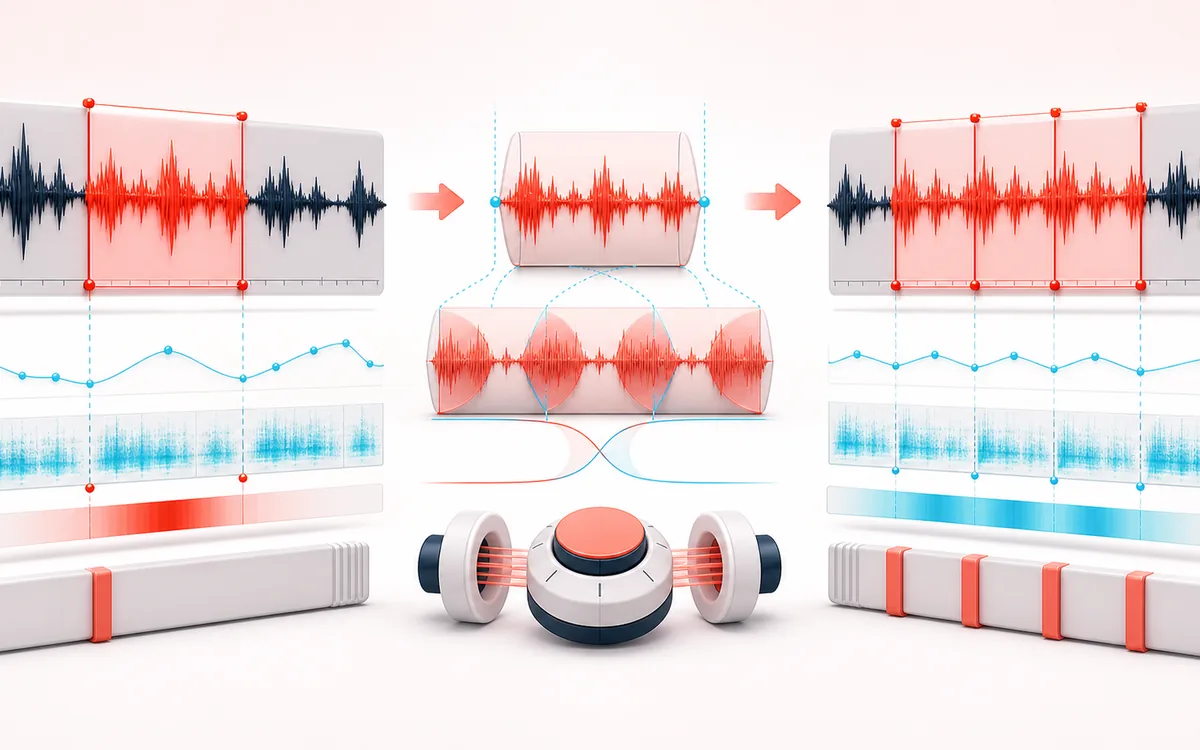
TIMELINE MAP
Repeat Seam Editor
Turn one long waveform into deliberate boundaries. The visual emphasizes the selection, transition and resulting edit so that timing decisions remain obvious before anything is rendered.
Open the full signal breakdownBest source, processing logic, limits and three-pass listening check
- Chosen audio region
Start with the right material
Game ambience, practice beds, podcast music, sound-design textures and extending a short recording to a requested duration.
- Crossfade and repeat
Understand the transformation
The selected decoded frames are optionally moved toward nearby zero crossings, then repeated with an equal-power overlap between neighboring copies. Output can use a repeat count or exact target duration.
- Looped render
Verify the usable result
A previewable WAV/MP3 loop plus a receipt for the actual region, repeats, duration, sample frames, peak, clipping and measured seam discontinuity.
Where this workflow stops
Zero crossing and crossfade can reduce clicks but cannot guarantee a perceptually seamless musical loop. Rhythm, harmony, ambience changes and long decays still need listening judgment.
Make the final decision by ear
- Zoom into every boundary and listen across it, not only inside it.
- Leave intentional handles when another editor will continue the work.
- Verify exact duration and ordering after the final render.
- Input
- One audio file in a format your current browser can decode.
- Loop controls
- Start and end region, nearest-zero-crossing assistance, seam crossfade, repeat count or target duration.
- Output
- A focused seam preview, measured receipt and locally rendered WAV or MP3 download.
How to make an audio loop online
- Select an audio file that your browser can decode, then mark the section you want to repeat.
- Refine the start and end. Use nearest-zero-crossing assistance when it helps reduce an abrupt sample jump.
- Set the crossfade and listen to the seam preview, which concentrates on the transition from the region's end back to its start.
- Choose a repeat count or target duration, render the loop, inspect the measured receipt and download WAV or MP3.
What the receipt is for: an input request is not proof of an output. The receipt records the resolved region, crossfade, repetitions and measured duration so timing-sensitive work can be checked rather than guessed.
Zero crossings and crossfades solve different seam problems
A zero crossing is a nearby point where the waveform passes through zero amplitude. Placing a cut near one can reduce the instantaneous jump between samples, which often helps with clicks. It does not align the musical beat, the phase of a sustained note or the evolution of room ambience.
A crossfade overlaps the tail of the selected region with its beginning while one side fades out and the other fades in. This can make ambience and sustained material transition more gradually, but a long crossfade can blur attacks or produce comb filtering when similar waveforms overlap out of phase.
Practical workflow: set the musical or environmental region first, try zero-crossing assistance, then adjust the shortest crossfade that makes the focused seam preview acceptable. Judge the loop in context as well as in isolation.
Audio Loop Maker versus Trimmer and Joiner
- Loop Maker
- Selects one repeatable region, treats its end-to-start boundary as a seam and renders repeated cycles by count or duration.
- Audio Trimmer
- Keeps or removes a time range once. Use it when you need a shorter clip rather than a repeating bed.
- Audio Joiner
- Orders and combines multiple files. Use it when the sources or sequence change instead of repeating one selected region.
Where a repeatable audio bed is useful
- Game ambience: prepare a rain, room-tone, engine or environmental region for repeated playback, then test the exported asset inside the game engine.
- Music practice: repeat a bar, progression or difficult phrase for focused rehearsal without restarting the source manually.
- Podcast and video beds: extend a licensed music or ambience region toward a planned narration duration, then mix and loudness-check it in the final session.
- Sound design: inspect how drones, textures and mechanical sounds behave across the loop seam before further layering.
Limits to check before publishing
- No guaranteed invisible seam: zero-crossing selection and crossfading are aids. Material with an unmatched beat, changing harmony, obvious transients or evolving noise can still reveal the join.
- Decoded audio, not untouched source bytes: browser decoding can resample the source to its audio runtime rate. Rendering creates a new audio file rather than performing a bit-perfect container edit.
- WAV versus MP3: WAV avoids another lossy encoding stage but remains a new render of the decoded signal. MP3 is re-encoded with a same-origin encoder loaded and run in the browser, so it is lossy even though the selected audio is not uploaded.
- Codec and device limits: input support varies by browser. Long, high-rate or multichannel files consume substantially more memory after decoding, so available device memory sets the practical duration.
- Rights still apply: use audio you created or have permission to edit and redistribute. Local processing does not grant a license to copyrighted music, samples or recordings.
Privacy: selected audio is processed in this browser and is not uploaded to AudioWrench. Normal page assets can still be requested as described in the privacy notice.
Audio Loop Maker: quick answer and technical limits
Quick answer: A local audio looper that repeats a selected region and can reduce the end-to-start transition with bounded zero-crossing snap and crossfade controls.
- Best for
- Game ambience, practice beds, podcast music, sound-design textures and extending a short recording to a requested duration.
- How it works
- The selected decoded frames are optionally moved toward nearby zero crossings, then repeated with an equal-power overlap between neighboring copies. Output can use a repeat count or exact target duration.
- What you get
- A previewable WAV/MP3 loop plus a receipt for the actual region, repeats, duration, sample frames, peak, clipping and measured seam discontinuity.
Know before you use it: Zero crossing and crossfade can reduce clicks but cannot guarantee a perceptually seamless musical loop. Rhythm, harmony, ambience changes and long decays still need listening judgment.
Privacy: Selected audio is processed in this browser and is not uploaded to AudioWrench. Normal page assets can still be requested as described in the privacy notice. Privacy details →