Online Drum Replacer
Detect drum hits, correct every trigger marker, then layer or replace them with a tuned kick, snare, clap, click or your own one-shot. Keep the full source timeline and export without uploading the recording.
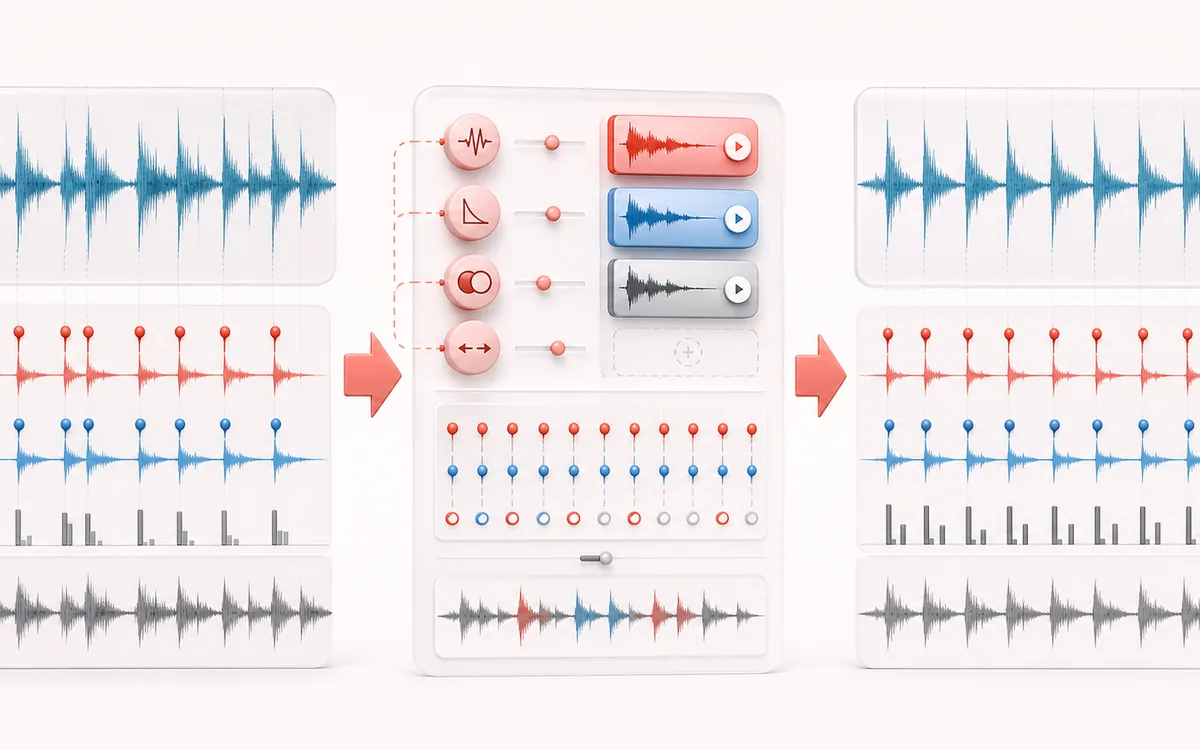
TIMELINE MAP
Drum Trigger Lane
Turn one long waveform into deliberate boundaries. The visual emphasizes the selection, transition and resulting edit so that timing decisions remain obvious before anything is rendered.
Open the full signal breakdownBest source, processing logic, limits and three-pass listening check
- Recorded drum track
Start with the right material
Reinforcing inconsistent kick or snare recordings, adding a click layer, auditioning replacement character and repairing missed or false drum triggers before export.
- Detect and replace hits
Understand the transformation
A bounded onset detector proposes editable markers; every enabled marker schedules a tuned, shaped replacement one-shot with timing offset, decay and source/replacement blend on the unchanged source timeline.
- Layered drum render
Verify the usable result
Source, combined and trigger-only monitoring with an editable hit map plus an exact-duration WAV or MP3 render.
Where this workflow stops
Dense mixes and overlapping drums can cause missed or false triggers, so markers require review. This layers or replaces hits; it does not cut samples like Transient Slicer or generate a new rhythm like Beat Maker.
Make the final decision by ear
- Zoom into every boundary and listen across it, not only inside it.
- Leave intentional handles when another editor will continue the work.
- Verify exact duration and ordering after the final render.
- Trigger detection
- Energy-flux onset proposals with sensitivity, minimum gap and sample-frame refinement.
- Replacement
- Four generated one-shots or one short custom local sample, with tune, decay, timing and level controls.
- Output
- Source, processed and triggers-only monitoring; exact source frame count in local WAV or MP3 export.
How to replace drum hits online
- Load a drum track, stem or room recording, or use the authored local hit demo.
- Set detection sensitivity and minimum hit gap, detect likely hits, then add, move, disable or remove markers.
- Choose a generated pad or load a short custom one-shot, then adjust pitch, decay, timing, source level and trigger level.
- Render and compare Source, Replaced and Triggers Only before exporting WAV or MP3.
Full-timeline triggering, not slicing
This tool treats onsets as playback cues. Each enabled marker starts the selected one-shot at an exact source frame plus the timing offset. The full source duration remains intact. It does not export regions like Transient Slicer, periodically stamp a tag like Audio Watermark, or create a new beat pattern like Beat Maker.
Layer or replace with control
Keep Source level at 100% for reinforcement, reduce it for replacement, or set it to 0% to hear only triggers. Tune changes one-shot playback rate; Decay changes its rendered envelope and tail. Negative timing offset moves triggers earlier but clips anything before frame zero rather than shifting the song.
Limits worth knowing
- Detection proposes likely onsets, not instrument labels. Cymbal wash, bleed and heavy limiting can create missed or extra triggers.
- Minimum gap suppresses double triggers but can also hide fast rolls. Edit the marker list when the performance needs exceptions.
- Custom one-shots are limited to 10 MB and 4 seconds, decoded and resampled locally to the source rate.
- The render uses a finite sample bound, not a mastering true-peak limiter. Leave headroom when layering loud samples.
- Source files beyond 80 MB, 12 minutes or the local memory plan are refused before processing.
Privacy: source audio and an optional custom one-shot are decoded, detected, mixed and encoded on this device. They are not sent to AudioWrench. Normal page assets may still be requested when the page loads.
Drum Replacer & Trigger: quick answer and technical limits
Quick answer: An onset-trigger workflow that detects drum hits, lets you correct the trigger markers and layers a synthetic or custom one-shot at those exact timeline positions.
- Best for
- Reinforcing inconsistent kick or snare recordings, adding a click layer, auditioning replacement character and repairing missed or false drum triggers before export.
- How it works
- A bounded onset detector proposes editable markers; every enabled marker schedules a tuned, shaped replacement one-shot with timing offset, decay and source/replacement blend on the unchanged source timeline.
- What you get
- Source, combined and trigger-only monitoring with an editable hit map plus an exact-duration WAV or MP3 render.
Know before you use it: Dense mixes and overlapping drums can cause missed or false triggers, so markers require review. This layers or replaces hits; it does not cut samples like Transient Slicer or generate a new rhythm like Beat Maker.
Privacy: Selected audio is processed in this browser and is not uploaded to AudioWrench. Normal page assets can still be requested as described in the privacy notice. Privacy details →