Drum Loop to MIDI Transcriber Online
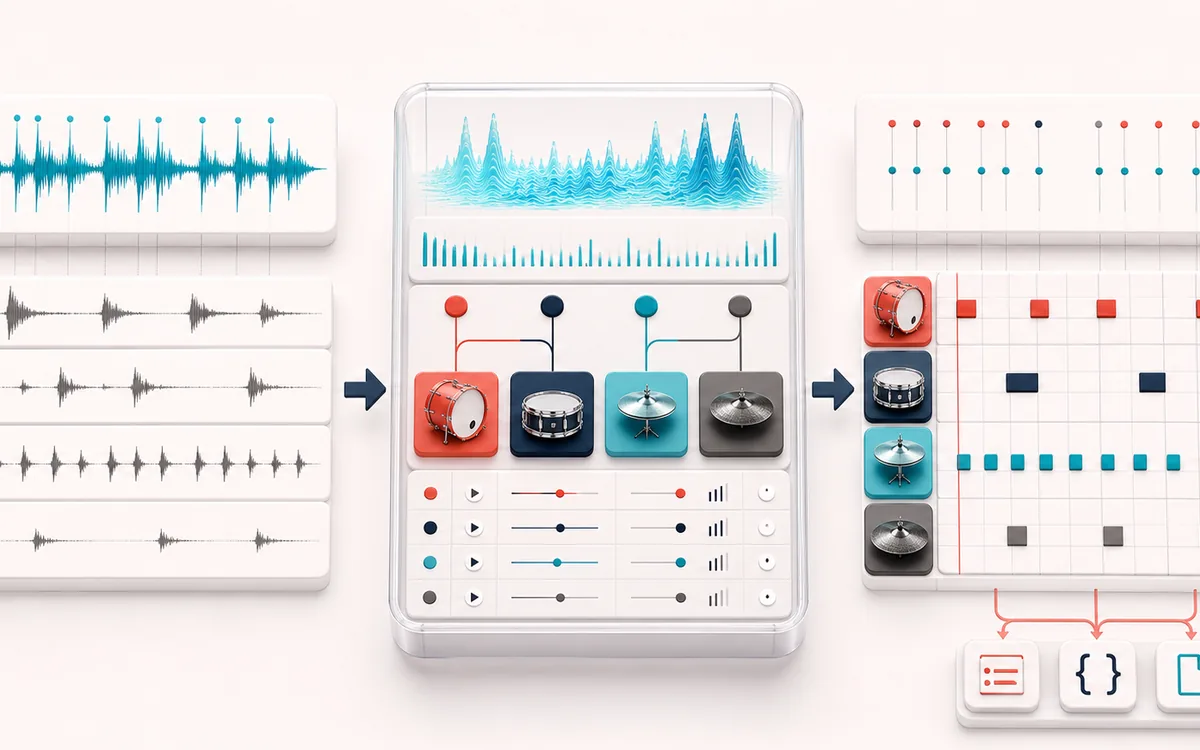
Turn a drum loop into an editable multi-instrument pattern. Detect transients, classify kick, snare and closed hi-hat, correct every event and export real Standard MIDI.
MUSICAL GRID MAP
Drum Event Grid
Connect detected or generated events to a musical grid. Pitch, rhythm and harmony become useful only when event timing, confidence and editable musical labels stay visible together.
Open the full signal breakdownBest source, processing logic, limits and three-pass listening check
- Recorded drum loop
Start with the right material
Rebuilding a simple drum loop with editable MIDI, layering samples under recorded hits or using a percussive reference as a sequencer starting point.
- Classify kit hits
Understand the transformation
Transient candidates are measured with bounded band-energy and attack features, assigned to drum classes, mapped against the selected BPM grid and exposed for manual note, timing and velocity correction.
- GM drum MIDI
Verify the usable result
An editable classified event list, original-versus-drum audition and reparsable GM drum MIDI plus CSV and JSON exports.
Where this workflow stops
Overlapping drums, cymbal wash, compression and non-drum sounds can confuse lightweight classification. It does not separate audio stems or identify every kit piece, so uncertain hits need manual review.
Make the final decision by ear
- Confirm tempo, downbeat and key before trusting labels.
- Review low-confidence events by ear and correct them manually.
- Import the result into its target instrument or DAW before committing.
- Three drum lanes
- Detected attacks are classified as GM kick 36, snare 38 or closed hi-hat 42.
- Human correction
- Change instrument, velocity or signed timing, delete false hits and add missed events.
- DAW-ready export
- Download finite CSV or JSON data and a format-0 Standard MIDI File on channel 10.
How to turn a drum loop into MIDI
- Choose a drum loop or generate the authored local demo.
- Set transient sensitivity, minimum gap, BPM and the beat-grid subdivision.
- Transcribe, then correct instrument classes, velocities and signed timing offsets.
- Compare the original with classified drum clicks and export MIDI, CSV or JSON.
Instrument transcription, not only groove feel
Groove Template Extractor records timing and velocity on one reusable note lane. Drum Loop to MIDI adds a different job: it uses low-frequency energy, spectral shape, zero crossings and decay to assign each transient to kick, snare or closed hi-hat. The result is a multi-instrument GM drum pattern.
This is also different from Voice to Instrument, which follows one pitched melody. Percussive classification does not estimate musical pitch and is intended for drum-focused loops.
Detection limits
- A mixed transient becomes one predicted event. Layered drums at the exact same moment may need a manually added second event.
- Heavy limiting, reverb, distorted bass and full mixes can confuse both transient detection and class prediction.
- Auto BPM is an estimate from onset spacing. Use the manual BPM and grid controls when the loop starts off-grid or has tempo changes.
- All selected audio is processed locally and is not uploaded to AudioWrench.
Drum Loop to MIDI: quick answer and technical limits
Quick answer: A drum transcription workspace that detects attacks, classifies their low, mid and high-frequency character and exports separate GM kick, snare and hi-hat notes.
- Best for
- Rebuilding a simple drum loop with editable MIDI, layering samples under recorded hits or using a percussive reference as a sequencer starting point.
- How it works
- Transient candidates are measured with bounded band-energy and attack features, assigned to drum classes, mapped against the selected BPM grid and exposed for manual note, timing and velocity correction.
- What you get
- An editable classified event list, original-versus-drum audition and reparsable GM drum MIDI plus CSV and JSON exports.
Know before you use it: Overlapping drums, cymbal wash, compression and non-drum sounds can confuse lightweight classification. It does not separate audio stems or identify every kit piece, so uncertain hits need manual review.
Privacy: Selected audio is processed in this browser and is not uploaded to AudioWrench. Normal page assets can still be requested as described in the privacy notice. Privacy details →