How to remove vocals from a song — free, in your browser.
Reduce or isolate a lead vocal for karaoke and remix sketches. Choose instant center-channel DSP or, when available, an optional UVR neural model that downloads and runs locally.
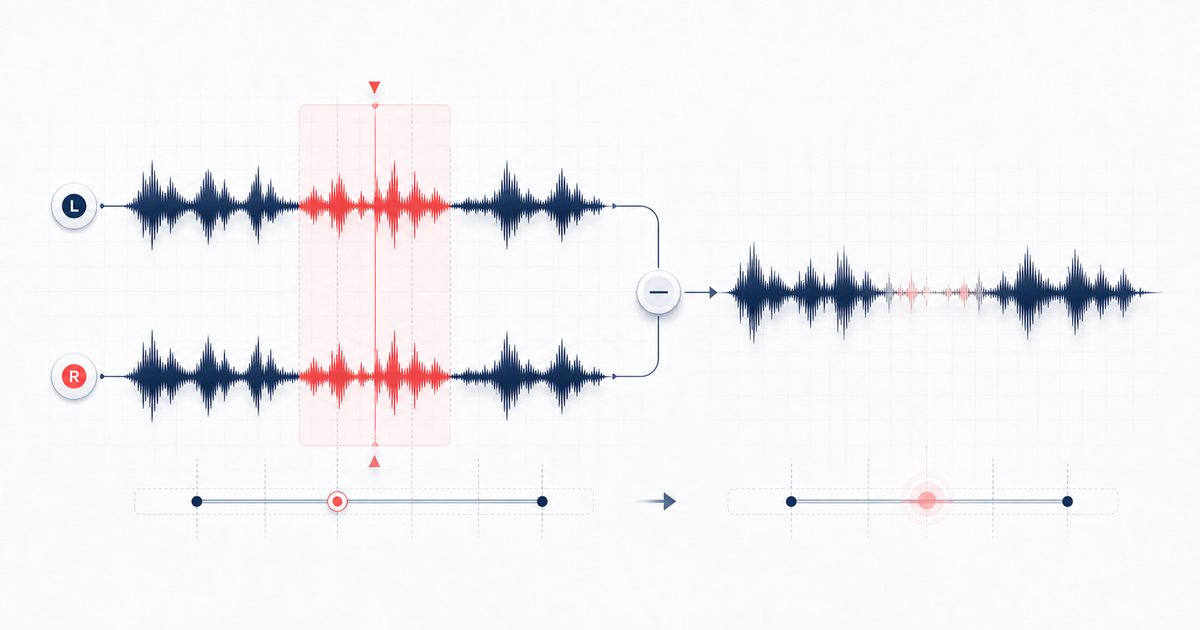
What "removing vocals" actually means
Many stereo mixes place the lead vocal near the center while some instruments and effects spread wider. Instant mode uses that convention: it compares left and right channels, then reduces or keeps centered vocal-frequency content. Reverb, doubled parts and anything off-center can remain.
Optional neural beta instead downloads an approximately 67 MB UVR-MDX-NET model plus its runtime and performs model-based separation locally. It is slower and requires a network download before first use, but the song itself is not uploaded. Neither mode is a magic un-mixer, so compare both and expect possible bleed or artifacts.
How to remove vocals from a song, step by step
- Open the Vocal Remover and drag your song onto the dropzone (or click to browse). MP3, WAV, FLAC, M4A and most other formats work. The file is decoded right there on your device — you will see its length, channel count and sample rate appear once it loads.
- Pick a mode. Choose 🎸 Remove vocals (instrumental) for a karaoke backing track, or 🎤 Isolate vocals (acapella) to keep only the voice. You can switch back and forth as many times as you like.
- Choose the engine. Instant phase DSP exposes separation intensity. Neural beta, when available, downloads and caches an approximately 67 MB model, then runs locally and may take much longer.
- Press ✨ Separate. Wait for the selected engine, then preview for bleed, missing instruments or artifacts. Processing time depends on track length, browser and device.
- Preview and download. Hit play on the Result player to A/B against the original. Happy with it? Use the download buttons to save a clean WAV, named for you as "your-track (instrumental)" or "(acapella)".
If you load a mono file, the tool flags it and falls back to a 200–4000 Hz notch instead of true phase cancellation. It still works, but the result is rougher — so reach for a stereo file whenever you have one.
Getting the cleanest possible result
A few habits make a big difference when you remove vocals from a song:
- Start with the highest-quality source. A lossless WAV or FLAC cancels far more cleanly than a low-bitrate MP3, where compression artifacts smear the stereo image.
- Lean on the intensity slider. If you can still hear the vocal, push toward 100%. If the instrumental sounds hollow or thin, ease it down — there is a sweet spot for every track.
- Manage expectations by genre. Straightforward pop, rock and hip-hop with a centered lead respond best. Heavily reverbed ballads, live recordings and tracks with double-tracked vocals will leave some residue.
- Use the acapella mode for sampling. Producers grabbing a vocal hook will find isolate mode bandpasses the center between 180 Hz and 8 kHz — the meat of the human voice — for a usable, if airy, acapella.
🎤 Try the Vocal Remover (free) →
Why do it in your browser?
AudioWrench decodes and processes the selected song on-device rather than uploading it for separation. Instant DSP can work after the page assets load; neural beta requires its model and runtime download before local inference. Inputs are capped at 200 MB and decoded audio may use much more memory. For an approximate four-way heuristic decomposition, compare the Stem Splitter.
FAQ
Can you remove vocals from a song completely?
Is removing vocals from a song free with this tool?
Does my song get uploaded to a server?
Why do I need a stereo file, and what happens with mono?
Sources and review notes
Instant center-channel DSP and optional neural separation are different modes with different speed, download and artifact trade-offs.
- W3C channel splitting and merging — Browser channel-routing primitives used in stereo DSP.
- ONNX Runtime Web documentation — How ONNX inference can run inside a web application.
- AudioWrench privacy notice — Mode-specific model hosting and browser/system provider disclosures.