Brown noise vs white noise for focus: which one actually helps.
A plain-English guide to how the two noise colours differ, when each may support concentration, and how to generate either one free in your browser. The generator does not upload audio to AudioWrench.
What "colour" of noise even means
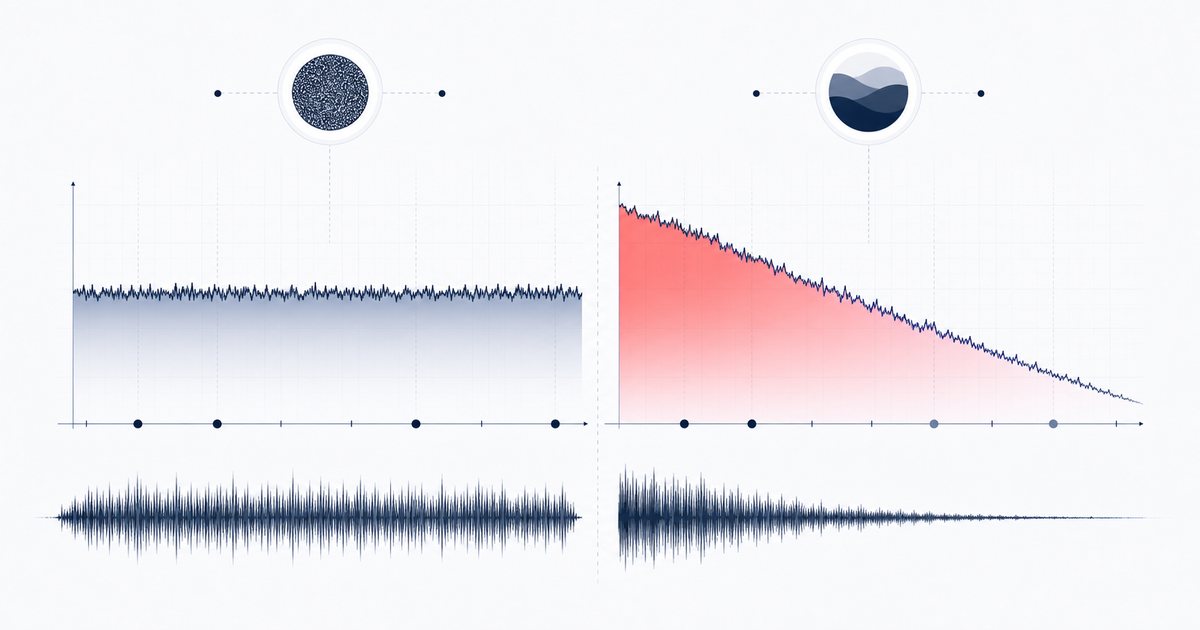
Noise gets named after colours of light because of how its energy is spread across the frequency spectrum. White noise contains equal energy at every frequency, so it sounds bright, flat and hissy — think of an untuned radio or TV static. Brown noise (named after Brownian motion, not the colour) rolls off those high frequencies steeply and piles its energy into the low end, so it sounds deep, soft and rumbly, like a heavy waterfall or distant ocean surf.
Between them sits pink noise, the most balanced and natural-sounding of the bunch, and green noise, a narrower band centred around 500 Hz that many people associate with nature ambience. Understanding this spectrum is the key to the whole brown noise vs white noise for focus question: you are really choosing how much treble you want sitting in the background while you work.
Brown noise vs white noise for focus, side by side
Neither colour is magic, and the research on noise and concentration is genuinely mixed. But there are clear, practical reasons people reach for one over the other:
- White noise is bright and even. Because it carries plenty of high-frequency energy, it excels at masking sudden, sharp distractions — a coworker's voice, a clattering keyboard, a barking dog. The downside is that the same brightness can feel harsh or fatiguing across a long study session.
- Brown noise is deep and warm. The missing treble makes it gentler on the ears, so a lot of people find it easier to leave running for hours. It is excellent for creating a cocoon of calm and for smoothing over low rumbles like traffic, but it masks high-pitched chatter less effectively than white noise.
- Pink noise is the middle path. If you cannot decide between brown and white, pink often feels like the most natural compromise and is a great default starting point.
The practical difference is spectral: white noise carries more high-frequency energy, while brown noise is weighted toward the low end. Either may mask parts of an environment, but comfort and perceived usefulness are personal and no focus outcome is guaranteed.
How to generate brown or white noise, step by step
AudioWrench's Noise Generator is built exactly for this kind of comparison — it lets you blend all four colours live and download a loop. Here is the real flow:
- Open the tool. Head to the Noise Generator. There is nothing to drop on the page and nothing to upload — the sound is created on your own device the moment the page loads.
- Blend your colours. Use the White, Pink, Brown and Green sliders to dial each one in from 0 to 100%. Push Brown up on its own to hear pure brown noise, or push White up for the bright version. You can also mix them — a little white over a brown base is a popular focus blend.
- Set the master volume. A separate master slider keeps the overall level comfortable so nothing clips or overpowers your work.
- Preview live. Hit ▶ Play to hear your mix instantly with a smooth, click-free fade-in. Tweak the sliders while it plays to find the sweet spot, and switch the brown and white levels back and forth to feel the difference for yourself.
- Add a sleep timer (optional). Choose 5, 15, 30 or 60 minutes and the sound will gently fade out and stop on its own — handy for naps or winding down.
- Download a 30-second loop. When you like the mix, use the download panel to render a seamless 30-second clip of your exact blend. Loop it in any media player for endless, gap-free background noise — no browser tab required.
🌫️ Try the Noise Generator (free) →
Why do it in your browser?
Most "noise apps" want a download, an account, and often a subscription, and many stream the generated audio while showing you ads. AudioWrench instead synthesises every sample on-device with the Web Audio API. There is no source-audio upload, no sign-up and no cost; ordinary page assets still load when you open the tool. Once the page is loaded, synthesis can continue without a network round-trip, and a downloaded loop plays without the browser.
Quick tips for comfortable background listening
- Start quiet. Noise should sit just below your awareness. If you notice it, it is probably too loud.
- Layer thoughtfully. A brown base with a touch of pink or white can mask both low rumble and bright chatter at once.
- Match the room. Use brighter blends in noisy open offices, warmer brown-heavy blends in quiet rooms where you just want to fill the silence.
- Loop, don't stream. Download your favourite blend so battery, data and buffering never interrupt your flow.
FAQ
Is brown noise or white noise better for focus?
What is the difference between brown noise and white noise?
Can I generate noise for free without downloading an app?
Why download a 30-second loop instead of streaming?
Sources and review notes
Noise colors describe spectral energy, while sleep outcomes depend on level, context and the individual. Evidence for continuous noise as a sleep aid remains mixed.
- Noise spectra in physiology and medicine — Definitions and power spectra for white, pink and Brownian noise.
- Noise as a sleep aid: systematic review — A review finding low-certainty and variable sleep evidence.
- WHO safe-listening guidance — Volume and exposure-duration precautions.