Binaural Beats.
Generate a stereo binaural beat, adjust carrier and difference frequencies, blend pink noise and export a session. Preset names describe conventional bands, not guaranteed effects.
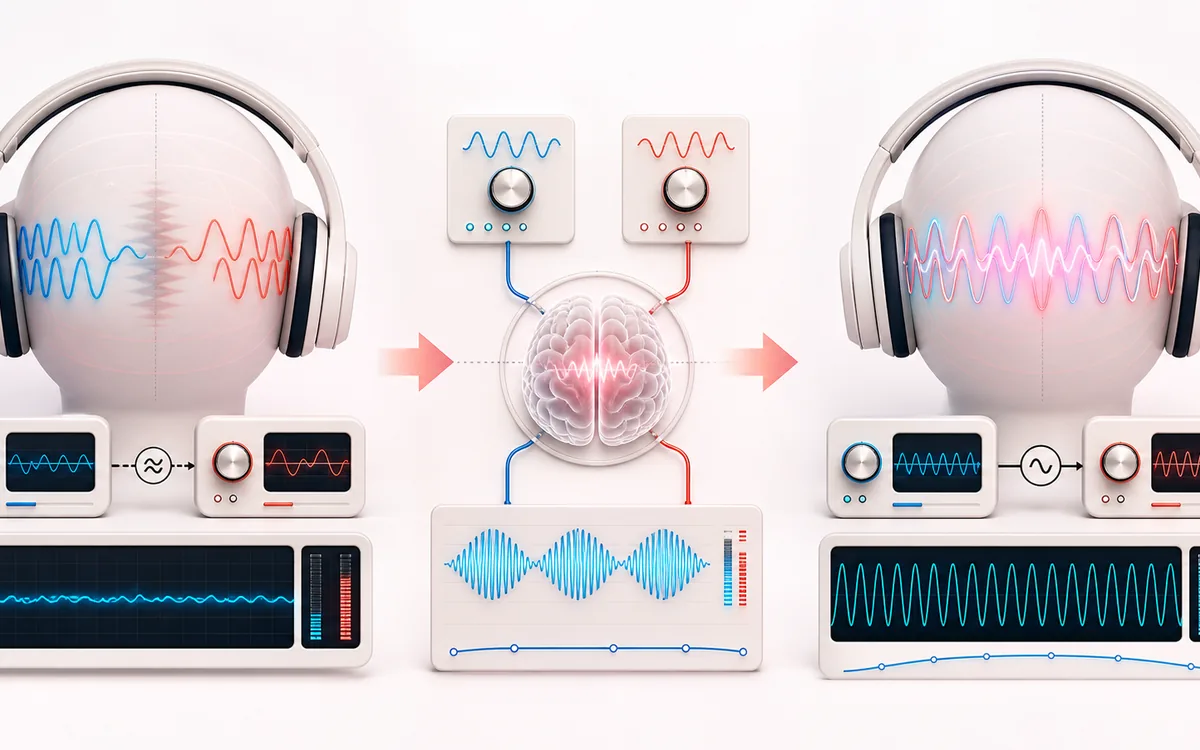
CALCULATED STEREO TONE PLAN
Binaural Frequency Split
Separate two audio channels, not claimed brain states. Left is the carrier; right adds the chosen difference. The workspace plots calculated tone samples and names their digital gain. This static artwork is illustrative, not a live signal, correlation meter or EEG measurement.
Open the full signal breakdownBest source, processing logic, limits and three-pass listening check
- Carrier and beat gap
Start with the right material
Understanding a stereo-tone presentation and creating a finite, reusable sound experiment without uploading a recording.
- Offset stereo tones
Understand the transformation
Left is the carrier and right is carrier plus difference. One shared Web Audio graph generates both preview and export, with native source-stop deadlines and down-only pink-noise headroom.
- Binaural signal
Verify the usable result
A calculated tone-only channel plan, controlled audio-play-time timer and 10-second to 10-minute stereo WAV/MP3 or local handoff, retaining the current Volume including exact silence at zero.
Where this workflow stops
Not EEG, a hearing calibration or a validated focus/sleep treatment. Mono playback changes channel separation; perceived beating varies. Audio suspension pauses the timer; MP3 is lossy and not guaranteed gapless. Large exports may need a shorter duration.
Make the final decision by ear
- Check left, right and difference frequencies before Play; use stereo headphones at a low device volume.
- Use Stop all audio or Escape; distinguish the audio-play-time deadline from a wall-clock alarm.
- Check the current Volume and File duration before exporting; preserve stereo, and do not assume MP3 is gapless.
How to use the binaural beats generator
- Use stereo headphones and a low device volume. Check that your player or accessibility settings are not combining the channels into mono.
- Set the left carrier (50–500 Hz) and the right-minus-left difference (0.5–40 Hz). Read both exact frequencies; conventional presets are not prescriptions for mental states.
- Choose Volume and optional Background pink noise. The fixed-scale picture is a calculated tone-only plan, not recorded audio or brain activity; 0% is exact silence.
- Choose Playback timer before Play stereo tones. Tone/level edits keep its deadline; a timer edit restarts it. Use Stop all audio or Escape to retire this graph.
- Choose a separate File duration and Download WAV, Download MP3 or Continue editing. Current levels are retained without peak boosts; settings changes discard any obsolete pending file.
The two tones are generated locally: right frequency equals left carrier plus the chosen difference. A perceived binaural pulse is not a third low-frequency sine in either isolated channel. Perception varies, especially at larger differences; no preset guarantees sleep, focus or a brain state. Preview uses an audio-clock timer, while export creates a new finite stereo session. Read the worked stereo, level and session-file examples.
Binaural Beats: quick answer and technical limits
Quick answer: A local stereo sine-tone generator with explicit left/right frequencies, optional common pink noise, owned playback and current-volume files.
- Best for
- Understanding a stereo-tone presentation and creating a finite, reusable sound experiment without uploading a recording.
- How it works
- Left is the carrier and right is carrier plus difference. One shared Web Audio graph generates both preview and export, with native source-stop deadlines and down-only pink-noise headroom.
- What you get
- A calculated tone-only channel plan, controlled audio-play-time timer and 10-second to 10-minute stereo WAV/MP3 or local handoff, retaining the current Volume including exact silence at zero.
Know before you use it: Not EEG, a hearing calibration or a validated focus/sleep treatment. Mono playback changes channel separation; perceived beating varies. Audio suspension pauses the timer; MP3 is lossy and not guaranteed gapless. Large exports may need a shorter duration.
Privacy: Tones and the repeating two-second pink palette are generated and encoded locally without a microphone or audio upload. Optional workspace storage stays on this device; normal page assets still load as described in the privacy notice. Privacy details →