How to make 8D audio — free, right in your browser.
Turn any track into the spinning, around-your-head 8D effect in a couple of clicks. It is free, processes the track on your device and does not upload the selected song to AudioWrench.
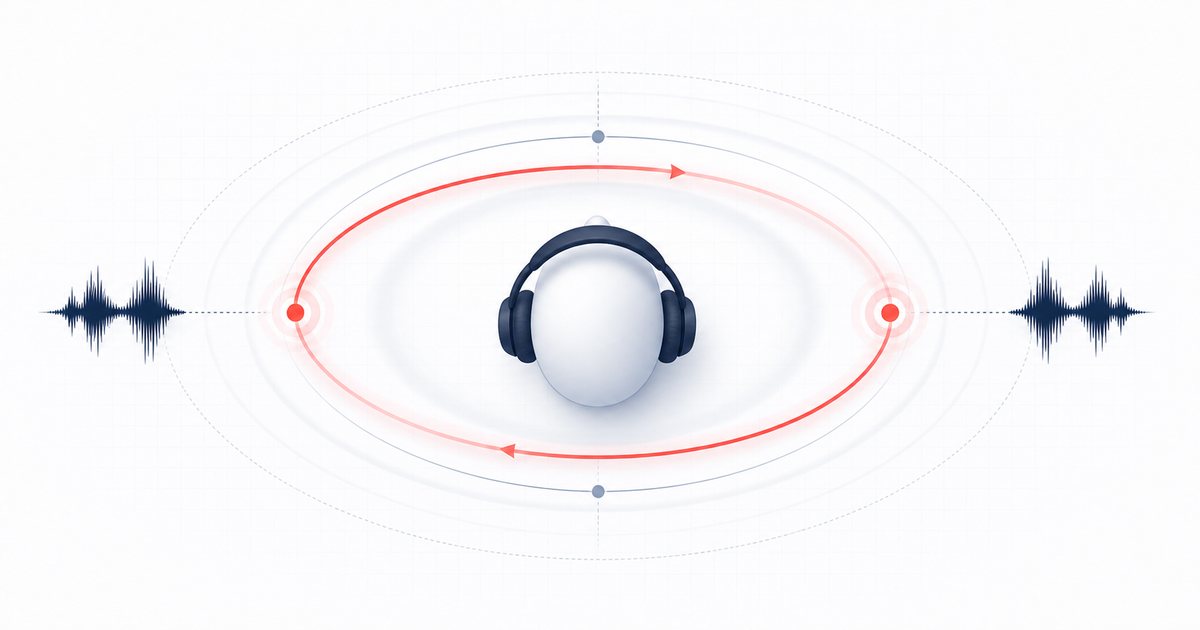
What 8D audio actually is
Despite the name, 8D audio is not some new surround format — it is a clever stereo trick. The sound is panned back and forth between your left and right ears on a slow, smooth curve, while a gentle volume wobble fakes the sense of the music drifting closer and farther away. Together those two moves make the song feel like it is slowly orbiting your head. Add a touch of reverb for room and the illusion really lands. That is the whole secret behind every viral "8D audio (use headphones!)" clip.
Because the effect lives entirely in the difference between the two stereo channels, you need headphones. Play an 8D track on a laptop or phone speaker and the channels blend back together, flattening the orbit into ordinary stereo. So before you start, grab your earbuds or cans.
How to make 8D audio step by step
The AudioWrench 8D Audio tool keeps the whole process on one page. Here is the real flow:
- Open the tool and drop your song onto the dropzone, or click to browse for a file. The selected song is decoded on your device and is not uploaded to AudioWrench.
- Pick a preset to get going fast. Choose 🌙 Slow orbit for a dreamy drift, 🎧 Classic 8D for the familiar TikTok-style spin, or 🌀 Fast spin for a dizzier ride. Classic 8D is selected by default.
- Fine-tune the orbit settings. The Rotation speed slider sets how fast the sound circles you (shown in Hz and seconds per orbit), and the Intensity slider controls how far it swings to each side. Nudge them until it feels right.
- Press “✨ Apply effect” to render the 8D version. The tool sweeps the panning and depth wobble across the whole track, adds a light hall reverb, and normalizes the level so it is not too quiet.
- Preview with your headphones on. Hit play on the “8D audio” player and listen to it circle your head. If you want it slower, faster, or wider, change a slider and apply again — it is instant.
- Download. When you are happy, save the rendered file. The orbit is baked in, so it sounds the same everywhere you share it.
🎧 Try the 8D Audio tool (free) →
Getting the spin just right
The single biggest factor is rotation speed. A slow orbit — around 0.06 to 0.12 Hz, or one lap every eight to sixteen seconds — feels hypnotic and musical, which is why it is the look most popular 8D edits go for. Crank the speed past 0.3 Hz and the sound starts whipping around fast enough to feel woozy; that can be fun for a few seconds but tiring over a full song. There is no single correct answer, so trust your ears.
Intensity decides how far the audio travels to each side. Higher intensity throws the sound almost fully into one ear at the extremes for a dramatic effect, while lower intensity keeps things subtle and centered. Songs with a strong, clear stereo mix and a busy arrangement tend to spin best — sparse, mono-leaning recordings have less to move around. If your source already sounds wide and lively, the 8D effect will pop.
Why make 8D audio in your browser?
Many "8D audio converter" sites require a track upload and server-side queue. AudioWrench computes the panning, depth wobble, reverb and final normalize on your own device using the Web Audio API. The selected song is not uploaded to AudioWrench, while normal page assets still load as described in the privacy notice. There is no account or cost, and the audio processing itself does not require a cloud round-trip.
It is also fast to iterate. Because rendering is local, you can tweak the orbit speed, re-apply, and hear the difference in seconds instead of re-uploading and re-downloading every time.
FAQ
Do I need headphones to hear the 8D effect?
What is the best rotation speed for 8D audio?
Is making 8D audio free, and is my song uploaded anywhere?
What audio file format do I get back?
Sources and review notes
“8D audio” is a popular name for an automated stereo spatial effect, not an eight-dimensional or individualized surround format.
- W3C PannerNode specification — Browser spatial panning model and parameters.
- W3C Web Audio use cases — Spatialization and convolution use cases.
- WHO safe-listening guidance — Headphone level and exposure precautions.