Learn · Generated noise and current-mix export
Mix colored noise. Keep the level you chose.
A noise mixer is useful only if its file represents the settings you heard. This guide follows one complete workflow: choose a texture, inspect the actual digital samples, play deliberately, set a timer and save the same pattern without silently turning a quiet mix up.
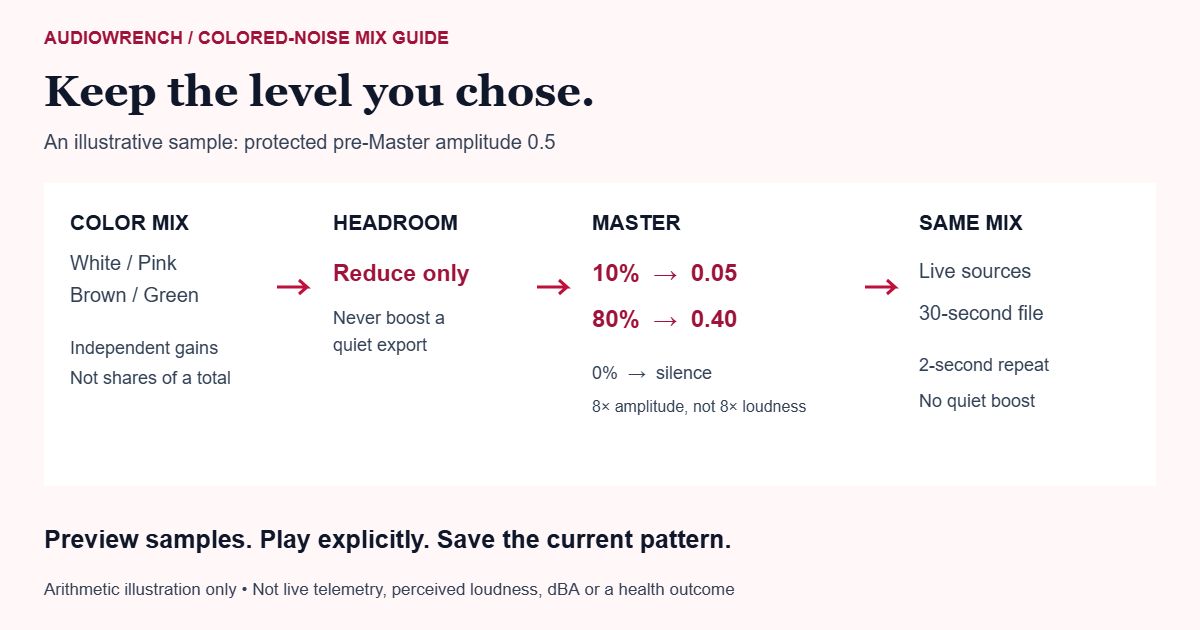
Step by step: one mix from controls to a useful file
- Set the texture while stopped. Begin with one color. The default is Pink 70%, the other colors 0%, and Master 60%. Controls create a preview but do not start playback or request a microphone.
- Compare one change at a time. Add another color in a small amount. Read Sample peak, RMS, digital and Mix headroom; these describe this generated pattern, not an average across every possible noise sample.
- Play explicitly. Play noise starts one owned four-layer graph. Fade and stop fades for 0.4 seconds. Stop all audio or Escape stops immediately. There is no confirmation sound from an idle slider.
- Choose a timer if needed. Select Off, 5, 15, 30 or 60 minutes. Changing it during playback restarts its countdown from that moment. Read the audio-clock limits below before relying on it.
- Save this mix. Download WAV, Download MP3 or Continue editing prepares the current settings. Playback is not required for export. If you change a color, Master or pattern during encoding, the obsolete output is discarded; wait, then export the new mix.
What white, pink, brown and green mean here
These labels describe different signal-generation methods, not quality rankings. White noise distributes power roughly evenly across equal-width frequency bands; pink noise is approximately balanced across octaves, with less power per hertz toward higher frequencies. Robin Whittle’s DSP collection explains this distinction and documents Paul Kellet’s pinking filter.
On a narrow screen, scroll tables sideways; with a keyboard, focus a table and use the arrow keys.
| Color | This implementation | What not to assume |
|---|---|---|
| White | Independent pseudo-random sample values spanning positive and negative amplitude. | It is not a recording, and a short pattern is not a certified measurement source. |
| Pink | The existing Paul Kellet IIR filter applied to white noise at a fixed 44.1 kHz pattern rate. | A finite two-second realization does not have an exact theoretical spectrum at every frequency. |
| Brown | A leaky integration of white noise; the generated layer is peak-scaled before mixing. | This finite, leaky filter is not an ideal unbounded mathematical random walk. |
| Green | A second-order bandpass around 500 Hz with Q 1.2, then layer peak-scaling. | “Green” here names this particular filter, not a universal specification shared by every app. |
Each layer is generated once per pattern. Moving sliders changes the mix of those same samples. New pattern (stops playback) creates new samples and stops the current graph; it never starts sound on its own. The sound repeats after two seconds, so a longer file is not thirty seconds of newly generated random events.
Color amounts, headroom and Master are separate
White 40% and Brown 60% mean gain coefficients 0.4 and 0.6. They do not mean a promised 40/60 split of perceived loudness, equal energy, or a required sum of 100%. The colors have different samples and distributions. Adding another layer can make their combined peaks larger.
The mixer estimates a conservative peak bound from the selected layer amounts. If needed, it applies one reducing-only headroom factor before Master. It never boosts a quiet mix to fill a target peak. Master then multiplies that protected signal, so changing Master from 10% to 80% produces eight times the digital amplitude for an otherwise unchanged pattern and mix, rather than another normalized file.
| Master | Resulting sample | Sample level |
|---|---|---|
| 10% | 0.5 × 0.1 = 0.05 | Approximately −26.0 dBFS |
| 80% | 0.5 × 0.8 = 0.40 | Approximately −8.0 dBFS |
| 0% | 0.5 × 0 = 0 | Digital silence, displayed as −∞ dBFS |
The numbers above are arithmetic examples, not the current pattern’s peak or at-ear sound pressure. Raising device volume changes your listening level without changing these file samples. The headroom estimate is not a certified true-peak limiter, acoustic exposure guarantee or LUFS loudness measurement.
Read the actual sample preview
- Waveform
- The first 20 milliseconds of the current export mix, on a fixed −1 to +1 amplitude axis. It changes because your samples or settings change, not because decorative animation suggests activity. A flat line at Master 0 is genuine digital silence.
- Sample peak
- The largest absolute sample across the complete two-second pattern, expressed in dBFS. Playback fades are not included, and speaker/headphone output is not measured.
- RMS, digital
- The root-mean-square sample level across that same pattern. It helps compare energy in this digital signal; it is not perceived loudness, integrated LUFS or a dBA sound-level meter.
- Mix headroom
- The reducing-only gain applied before Master, or No reduction. The displayed actual peak can be lower than the conservative bound because layers do not necessarily peak together.
- Pattern / repeat
- The current pattern number and two-second repetition period. The same palette drives the live sources and export; browser output resampling and device processing can still affect what you hear.
What the sleep timer does—and cannot guarantee
The countdown uses the Web Audio context’s clock, not a delayed JavaScript callback as the authority for stopping sound. At its deadline the graph fades over four seconds and the sources are scheduled to stop. MDN describes this audio scheduling clock; its source-node documentation describes looping and scheduled stops.
Selecting Off replaces the scheduled sources at the current loop phase without retaining the old timer. A manual fade is different: it remains visibly Fading out until sound has stopped. Stop all audio is available during both a pending start and a fade.
A hidden tab may continue noise, which is useful for background playback, but browsers and operating systems can suspend audio when a device locks, sleeps or conserves power. If the audio clock pauses, so does this countdown. This is not a wall-clock alarm or a promise of uninterrupted overnight playback. Leaving the page stops the graph; returning requires explicit Play.
Choose the file for the job
WAV: a 30-second, 44.1 kHz, 16-bit stereo file. Left and right are identical copies of the mono mix, not a binaural or spatial effect. It contains fifteen copies of the two-second pattern. An eight-millisecond cyclic crossfade bridges the generated pattern boundary; no silence or start/stop fade is added to the exported PCM.
MP3: the same selected digital mix is encoded locally at 320 kbps. Lossy encoding changes decoded samples, and encoder delay or player behavior can introduce a gap at a repeat. Do not infer guaranteed sample-continuous playback merely from the .mp3 extension. LAME’s documentation discusses encoder-delay compensation. Use WAV when preserving a PCM loop boundary matters, and test the destination player.
Continue editing: keeps this WAV in the existing local workspace and opens the tool navigator. It stays on this device for up to 24 hours, subject to browser storage availability; the generated WAV is not uploaded to AudioWrench. If storage fails, the normal downloads remain available. For a normal download, the separate local-handoff panel lets you choose whether to keep that result. Changing settings while an encoder finishes cannot silently relabel its old file as your new mix.
Fix the specific symptom
- Play is active but there is no sound: check Master, at least one color, your output device and system volume. A silent selected mix is labeled; it is not an audio-permission success guarantee.
- Audio output cannot start: the page shows the failure and retains your settings. Retry Play noise after checking the browser/output setup. Stop all audio cancels a delayed attempt.
- The saved file sounds quieter: check player volume and any normalization or audio enhancement. The file now retains your chosen Master rather than boosting itself to a fixed peak.
- A loop still sounds repetitive: it is a two-second pattern by design. New pattern changes its realization; export does not silently generate a different sound.
- MP3 has a repeat gap: try the WAV in a sample-continuous player. A processed copy made by another tool may introduce its own fades or delay.
- An export was discarded: you changed the audio while it was being prepared. Wait for that bounded job to finish, then Download again. You do not need to restart playback.
Sources and review notes
Worked gain examples and a reviewed local noise workflow, not a clinical, sleep or focus outcome. The graphic is illustrative; tool waveform and peak/RMS come from generated samples. MP3 sample-continuous looping is not guaranteed.
- Robin Whittle: DSP generation of pink noise — White/pink spectral distinction and the documented Paul Kellet pinking filter.
- MDN: AudioBufferSourceNode — Looping buffer sources and scheduled native stop; not acoustic calibration.
- MDN: BaseAudioContext currentTime — Audio scheduling clock and its distinction from a wall-clock alarm.
- LAME: encoder delay documentation — Encoder-delay compensation; no promise about every destination MP3 player.
Keep reading
Brown noise versus white noise covers the existing comparison. For visual inspection, use Audio Oscilloscope; to understand limits of uncalibrated tones, read the tone setup guide.