Online Chord Progression Detector.
Analyze a complete song into an editable, time-aligned major and minor chord sequence — then transpose the display, show capo shapes and export your corrections.
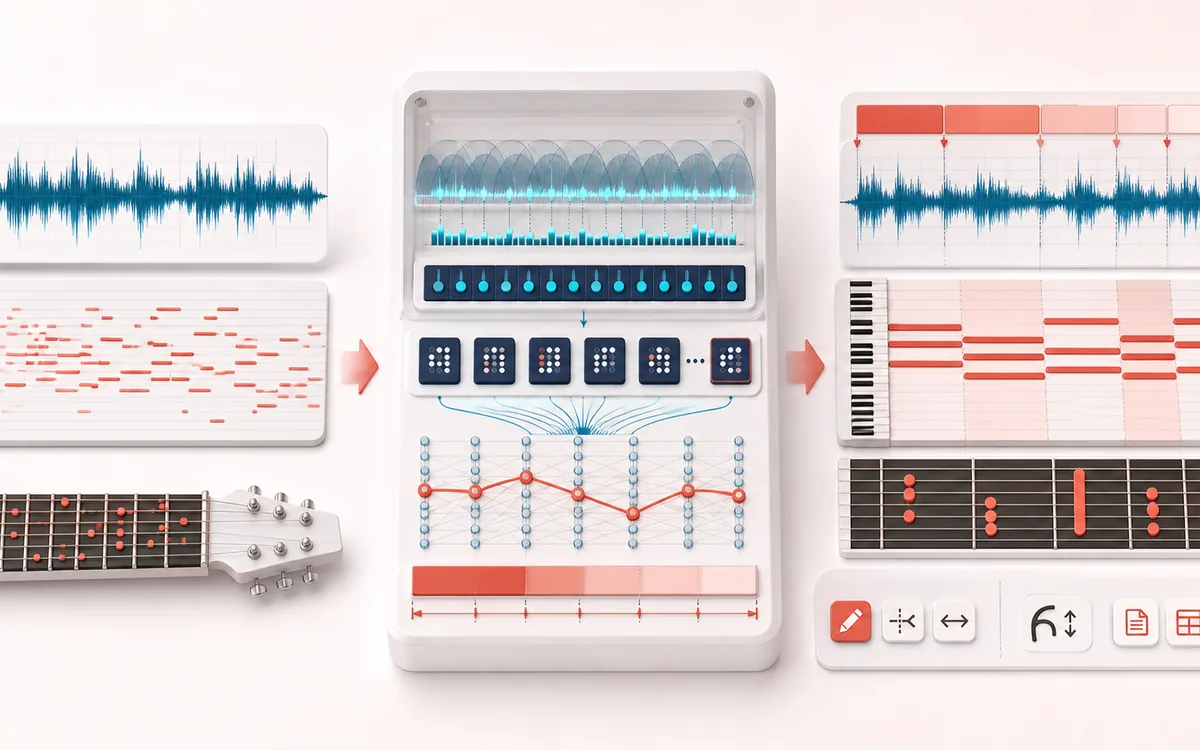
MUSICAL GRID MAP
Chord Timeline Map
Connect detected or generated events to a musical grid. Pitch, rhythm and harmony become useful only when event timing, confidence and editable musical labels stay visible together.
Open the full signal breakdownBest source, processing logic, limits and three-pass listening check
- Harmonic recording
Start with the right material
Learning a progression, drafting a transcription, checking harmony before a remix and exporting a time-coded chord outline for later correction.
- Estimate chord segments
Understand the transformation
A gap-free scan aggregates overlapping Hann-window FFTs into at most 1,200 tuning-aware twelve-bin chroma frames, scores 24 major/minor templates plus N, then applies a Viterbi path and minimum-duration smoothing.
- Editable progression
Verify the usable result
A confidence-labelled chord timeline with manual edit/merge/split controls, transposed or capo-oriented display and TXT/CSV/JSON exports containing exact boundaries and analysis settings.
Where this workflow stops
This is conventional-DSP estimation, not perfect chord recognition. One global tuning offset is estimated around A440, but tuning changes, extensions, inversions, bass movement, dense mixes, percussion and keys outside the 24-template major/minor vocabulary can still confuse it.
Make the final decision by ear
- Confirm tempo, downbeat and key before trusting labels.
- Review low-confidence events by ear and correct them manually.
- Import the result into its target instrument or DAW before committing.
How to detect a chord progression
- Drop a song or recording and let the local full-file analysis finish.
- Click any timeline time to seek, then check each estimated major, minor or no-chord label by ear.
- Edit labels, split a change that needs a tighter boundary, or merge neighbouring segments.
- Choose a transpose interval and capo fret, then export TXT, CSV or JSON.
This online chord progression detector maps overlapping FFT windows into 12 pitch classes, bounds that evidence into at most 1,200 timeline frames, compares those frames with 24 major and minor triad templates, and smooths brief label changes. Unlike a song key finder, it follows harmony across time instead of returning one global key. Unlike melody transcription, it estimates simultaneous chord tones rather than a single note line. Processing covers the complete decoded file and stays in your browser.
Automatic chord recognition is an aid for practice, arrangement and first-pass transcription. Dense production, inversions, suspended or extended chords, quiet passages and recordings that change tuning can produce ambiguous labels; the tuning estimate is global. The visible confidence is an uncalibrated score margin, not a probability or accuracy promise. Edit the timeline and trust your ears before performing or publishing a chart.
Online Chord Progression Detector: quick answer and technical limits
Quick answer: A local full-file chord progression detector that estimates a changing timeline of major, minor or no-chord segments instead of returning one global song key.
- Best for
- Learning a progression, drafting a transcription, checking harmony before a remix and exporting a time-coded chord outline for later correction.
- How it works
- A gap-free scan aggregates overlapping Hann-window FFTs into at most 1,200 tuning-aware twelve-bin chroma frames, scores 24 major/minor templates plus N, then applies a Viterbi path and minimum-duration smoothing.
- What you get
- A confidence-labelled chord timeline with manual edit/merge/split controls, transposed or capo-oriented display and TXT/CSV/JSON exports containing exact boundaries and analysis settings.
Know before you use it: This is conventional-DSP estimation, not perfect chord recognition. One global tuning offset is estimated around A440, but tuning changes, extensions, inversions, bass movement, dense mixes, percussion and keys outside the 24-template major/minor vocabulary can still confuse it.
Privacy: Selected audio is processed in this browser and is not uploaded to AudioWrench. Normal page assets can still be requested as described in the privacy notice. Privacy details →