Audio Sprite Builder
Pack ordered sound effects into one exact timeline, audition every mapped slice, and export a single WAV or MP3 with Howler-style JSON, generic JSON and CSV cue maps.
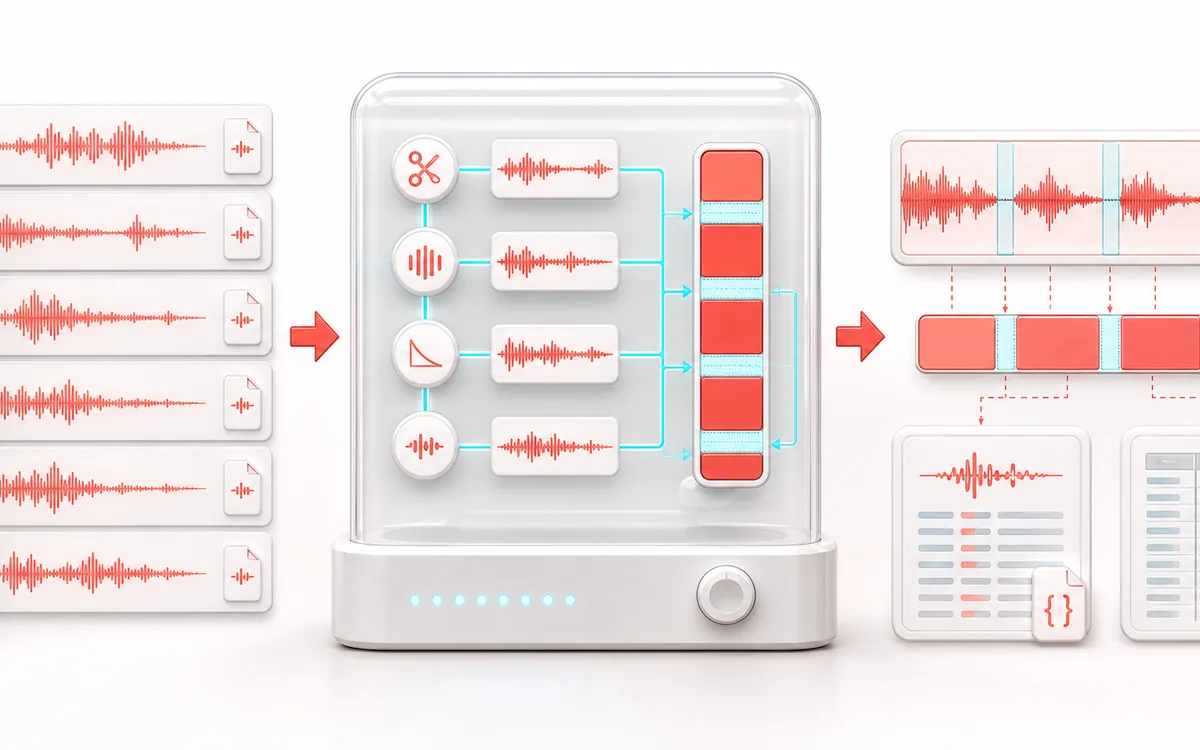
FILE STRUCTURE MAP
Sprite Cue Atlas
Follow audio, metadata and delivery as separate layers. Container work is easier to trust when decoded audio, editable fields and the final export are shown as distinct stages with explicit preservation limits.
Open the full signal breakdownBest source, processing logic, limits and three-pass listening check
- Short audio clips
Start with the right material
Combining interface sounds, game effects, pronunciation clips or recurring cues into one network-friendly audio asset with a machine-readable cue map.
- Pack with cue gaps
Understand the transformation
Each queued file is decoded and optionally trimmed, normalized and faded, then resampled to one format and written sequentially with a controlled gap while exact frame boundaries are recorded.
- Audio sprite bundle
Verify the usable result
One previewable WAV or MP3 sprite plus Howler-style and generic JSON or CSV maps whose cue times correspond to the packed PCM timeline.
Where this workflow stops
Codec seeking can land near rather than exactly on compressed MP3 boundaries, so WAV is preferable for sample-accurate work. This packs one combined asset; Sample Pack Builder exports separate conditioned files.
Make the final decision by ear
- Keep the untouched original until the exported file is verified.
- Confirm sample rate, channels, duration and metadata independently.
- Test the delivery in the application or device that will consume it.
- One packed sprite
- Every cue gets deterministic start and end frames inside one PCM timeline with configurable non-overlapping gaps.
- Safe preparation
- Bounded edge trimming, optional peak normalization and short fades prepare SFX without silently removing unlimited ambience or tails.
- Developer maps
- Export Howler-style millisecond pairs plus a frame-accurate generic JSON manifest or CSV cue sheet.
How to build an audio sprite online
- Load several short sound effects or start with the synthetic three-cue demo.
- Set their authored order, silence threshold, maximum trim per edge, safety gap, normalization and fades.
- Build the local sprite and audition any cue from its mapped start position in the shared player.
- Export one WAV or MP3 file and the matching Howler JSON, generic JSON or CSV map.
Why cue maps matter
A sprite file is useful only when code can recover every sound reliably. This builder records integer start frames and exclusive end frames first, then derives milliseconds from the chosen sample rate. That keeps the generic manifest aligned with PCM while providing the millisecond pairs expected by Howler-style playback.
Different from a joiner or sample pack
An audio joiner creates one continuous listening sequence. A sample pack builder exports separate cleaned files. Audio Sprite Builder deliberately does the opposite: it packs multiple independently addressable SFX into one delivery file, creates collision-safe cue keys, reserves explicit gaps and exports machine-readable slice maps.
Processing limits and accuracy
- Trim detection uses decoded sample amplitude and never removes more than the configured maximum from either edge.
- WAV maps are frame-exact. MP3 encoders can add codec delay or padding, so browser players may seek a few milliseconds differently.
- Linear resampling is appropriate for compact SFX delivery, but critical mastering work may benefit from a dedicated high-order resampler.
- Peak normalization is optional and does not provide loudness matching or limiting.
- The workspace limits clip count, input bytes and estimated decoded memory before packing.
Privacy: selected clips are decoded and packed in this browser. Audio payloads and generated maps are not uploaded. Normal page assets can still be requested when the page loads.
Audio Sprite Builder: quick answer and technical limits
Quick answer: A delivery tool that packs several short clips into one audio file and produces exact start and duration lookup data for triggering each clip by name in an app, game or website.
- Best for
- Combining interface sounds, game effects, pronunciation clips or recurring cues into one network-friendly audio asset with a machine-readable cue map.
- How it works
- Each queued file is decoded and optionally trimmed, normalized and faded, then resampled to one format and written sequentially with a controlled gap while exact frame boundaries are recorded.
- What you get
- One previewable WAV or MP3 sprite plus Howler-style and generic JSON or CSV maps whose cue times correspond to the packed PCM timeline.
Know before you use it: Codec seeking can land near rather than exactly on compressed MP3 boundaries, so WAV is preferable for sample-accurate work. This packs one combined asset; Sample Pack Builder exports separate conditioned files.
Privacy: Selected audio is processed in this browser and is not uploaded to AudioWrench. Normal page assets can still be requested as described in the privacy notice. Privacy details →