Online Arpeggiator & MIDI Export.
Turn one chord or a progression into an editable rhythmic note sequence, hear it in your browser and export real MIDI, exact-frame WAV, MP3 or JSON.
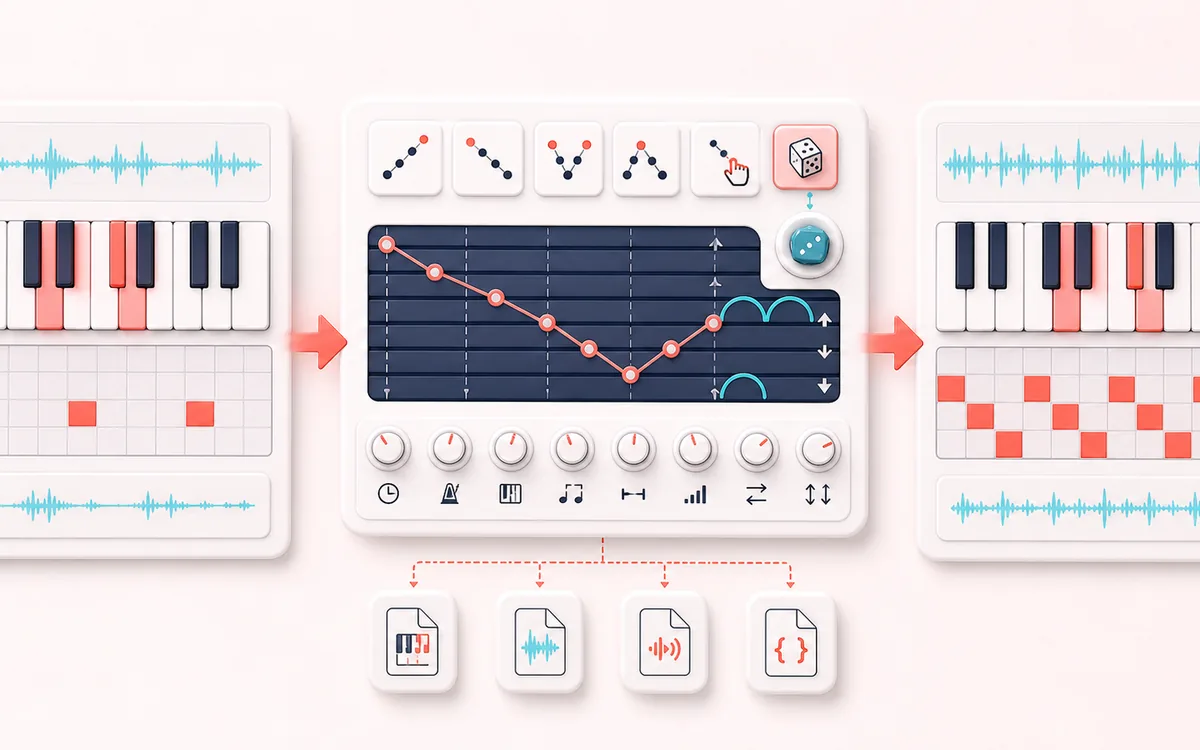
MUSICAL GRID MAP
Arpeggio Pattern Lane
Hear the exact chord-tone pattern you can inspect. Chord choices, rate, gate and swing create a visible note-event sequence. The piano roll and editable table are the actual model; there is no input-song analysis or confidence detector.
Open the full signal breakdownBest source, processing logic, limits and three-pass listening check
- Chord tones
Start with the right material
Turning a chord into a rhythmic synth pattern, testing inversions, practicing chord tones or exporting an exact arpeggio into a DAW.
- Order notes by rate
Understand the transformation
Up, down, up-down, down-up and played orders are deterministic; random order uses a visible seed. Rate, BPM, bars, swing, gate, velocity, inversion and octave controls define the emitted note events.
- Arpeggio sequence
Verify the usable result
A visible chord-tone and step sequence with manual edits, local synth preview, Standard MIDI File format 0, WAV/MP3 audio and JSON exports.
Where this workflow stops
This is a note-ordering tool, not an audio effect or automatic harmony engine. The musician supplies the chord material and remains responsible for voicing, sound design and arrangement.
Make the final decision by ear
- Check resolved chord spelling, pattern endpoints, gate and swing in the step table.
- Play prepares a reference-synth audition; Stop or Escape can cancel that pending start without changing the musical model.
- MIDI and JSON use the event model. WAV and MP3 use its current rendered audio, and an edit retires a pending old audio download.
How to make an arpeggio and MIDI file
- Choose the harmony. Choose a root and chord quality, then optionally add up to eight chord slots for a progression.
- Set the motion. Select a pattern, octave range, note rate, tempo, length, gate, swing, velocity, accents and inversion.
- Regenerate and edit. Regenerate the steps, then enable notes or edit pitch, velocity and duration directly in the step table.
- Preview and export. Use Play for the local reference synth and Stop or Escape to cancel even a preparing audition. Export the current event model as MIDI or JSON, or its rendered audio as exact-frame WAV or locally encoded MP3.
Keep audition and export under your control
Preparing is not playing. Play may first render the current steps and wait for browser audio. Stop remains available during that wait; Escape also cancels an unfinished render or pending audio download. A stopped audition never starts later when the wait ends, and returning to the page requires a fresh Play.
Stop and Cancel render are different. Stop retires the audition but can leave a useful render finishing locally. Cancel render discards partial PCM while keeping your editable chord-tone steps. After a playback error, press Play to retry; if the browser blocks audio, allow playback first.
Download the model you reviewed. Changing a setting, regenerating or editing a step retires an unfinished old audio export. WAV uses the current 48 kHz stereo reference-synth buffer; MP3 encodes that same buffer and may add codec padding. MIDI has events rather than the preview instrument's sound; use JSON to retain the musical settings and event receipt.
A focused arpeggio sequencer, not a general composer
This arpeggiator sequences the notes already defined by your chord choices. Up, Down, Up-Down and Down-Up are deterministic. Played preserves the resolved chord-tone order, while Random uses a visible seed that can be reproduced or mutated. Gate is a percentage of the selected rate. Swing delays every second step by the selected percentage of one step while the grid length stays fixed.
It is deliberately different from the Chord Progression Generator, which creates and sounds block chords; a melody generator, which follows a scale and contour; and a bassline generator, which builds a low-register groove. This page only turns chosen chord tones into an arpeggio.
Patterns, octaves and timing
- Directional patterns
- Up and Down visit every expanded chord tone once. Up-Down and Down-Up reverse through the inner notes so neither turning endpoint is duplicated.
- Rate and triplets
- The 480 PPQ grid uses 480 ticks for 1/4, 240 for 1/8, 160 for 1/8T, 120 for 1/16 and 80 for 1/16T.
- Gate and swing
- Gate multiplies the nominal step ticks. Swing delays odd-numbered steps by rate ticks × swing percent without moving the following grid line.
- Accents
- Base velocity applies to every step; an optional interval adds a bounded boost to every nth step.
MIDI, WAV, MP3 and JSON parity
One bounded event list drives the piano roll, synth and every download. MIDI is a format 0 Standard MIDI File with one 480 PPQ track, explicit tempo, matched note events and an end marker at the musical grid duration. WAV is rendered at 48 kHz to the exact calculated frame count. MP3 is a lossy local encoding of that same exact source buffer and may report codec padding in some players. JSON records settings, chord spelling, steps, ticks and exact source-frame duration.
Safety bounds: up to eight chord slots, four octaves, 32 bars or 16 cycles, 4,096 generated steps and 180 seconds of 48 kHz stereo PCM. Changing a musical setting marks the current steps and audio stale; regenerating creates a fresh bounded model. Cancelling discards partial audio.
Online Arpeggiator & MIDI Export: quick answer and technical limits
Quick answer: A local arpeggiator that expands editable chord tones into ordered, rate-based note steps across one or more octaves.
- Best for
- Turning a chord into a rhythmic synth pattern, testing inversions, practicing chord tones or exporting an exact arpeggio into a DAW.
- How it works
- Up, down, up-down, down-up and played orders are deterministic; random order uses a visible seed. Rate, BPM, bars, swing, gate, velocity, inversion and octave controls define the emitted note events.
- What you get
- A visible chord-tone and step sequence with manual edits, local synth preview, Standard MIDI File format 0, WAV/MP3 audio and JSON exports.
Know before you use it: This is a note-ordering tool, not an audio effect or automatic harmony engine. The musician supplies the chord material and remains responsible for voicing, sound design and arrangement.
Privacy: Selected audio is processed in this browser and is not uploaded to AudioWrench. Normal page assets can still be requested as described in the privacy notice. Privacy details →